

 UAU Ready
Description
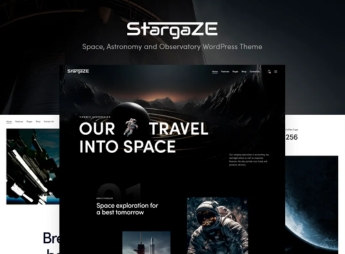
Stargaze allows the creation of websites for observatories, planetariums, and astronomical research centers, combining immersive dark layout, high-resolution image gallery with zoom, lunar event calendar, and section of scientific articles. Indicated for scientific institutions, astronomy clubs, and museums, the theme dispenses with code editing when assembling informative pages through a responsive visual builder and offers color and typography customization.
Key Features of Stargaze
- Immersive dark layout
Nighttime interface that highlights astronomical images and reduces visual fatigue. - High-resolution gallery
Exhibition of photos of nebulae, galaxies, and celestial bodies with zoom and lightbox. - Celestial event calendar
Programmable agenda for full moon, eclipses, meteor showers, and special observations. - Article and blog section
Space for scientific publications, discoveries, and news from the universe. - Native visual customization
Adjustment of colors, typography, and layout via own panel without need for programming.
Benefits of Stargaze
- Immersive visual impact
Attracts visitors with dark aesthetics that values astronomical images. - Simplified content management
Keep gallery, calendar, and blog updated without technical knowledge. - Public engagement
Event calendar and articles encourage recurring visits to the site. - Professional identity
Thematic layout reinforces the credibility of the scientific institution or club.
For Whom is Stargaze Indicated?
- Observatories and planetariums that want to disclose their observation schedule and astronomical content.
- Science museums and research centers that need a thematic website with gallery and calendar.
- Astronomy clubs and amateur astronomers’ associations that want to share discoveries and events.
- Educational institutions that offer courses and lectures on astronomy and space sciences.
How to Download Stargaze
Stargaze is available for download here on Ultrapack. After downloading the .zip file, install in Appearance > Themes > Add New > Upload Theme, select the .zip and activate. The theme will be ready for immediate use, with importable demos and customization options in the panel.
Focused on scientific institutions, astronomy clubs, and museums, Stargaze offers a set of visual and editorial tools that simplify the communication of astronomical content. The dark layout and high-resolution gallery value celestial images, while the calendar and blog keep the public informed about events and discoveries — all manageable without writing a line of code.
Frequently asked questions
Is Stargaze – Space, Astronomy and Observatory WordPress Theme GPL-licensed?
Yes. Stargaze – Space, Astronomy and Observatory WordPress Theme is distributed under the GPL (GNU General Public License). You may legally use, modify and redistribute it on as many sites as you want.
Can I use Stargaze – Space, Astronomy and Observatory WordPress Theme on multiple sites?
Yes. You can install Stargaze – Space, Astronomy and Observatory WordPress Theme on as many sites as you want. Only automatic updates through Ultrapack Auto Updater have a limit: from 3 to 80 sites, depending on the plan.
How much does Stargaze – Space, Astronomy and Observatory WordPress Theme cost at Ultrapack?
Stargaze – Space, Astronomy and Observatory WordPress Theme costs US$2.99 as a single purchase, and it is also included in the subscription plans starting at US$12/mo (VIP I).
Does Stargaze – Space, Astronomy and Observatory WordPress Theme include updates?
Yes. The current version of Stargaze – Space, Astronomy and Observatory WordPress Theme is 1.2, published at Ultrapack on Dec 20, 2024. Subscribers update straight from the WordPress dashboard with UAU (Ultrapack Auto Updater).
Is Stargaze – Space, Astronomy and Observatory WordPress Theme scanned before publication?
Yes. Every version of Stargaze – Space, Astronomy and Observatory WordPress Theme goes through a malware scan (ClamAV and YARA rules, at UltraHub) before it is published.
How to install
Automatic updates: this item is updated by the Ultrapack Auto Updater. With it installed, the new version shows up in your dashboard like any other WordPress update (how to set it up).
The file on this page is the developer’s full package, with documentation, demos and plugins. Do not upload that file to WordPress. The theme comes ready inside it, as a ZIP of its own, and that is the one you upload.
- Download the file
elements-stargaze.zipand extract it on your computer. - Look inside the extracted files for the file
Stargaze_v1.2/stargaze.zip. - In the WordPress dashboard, go to Appearance > Themes > Add New > Upload Theme.
- Select that file and click Install Now.
- Click Activate.
- There is nothing to zip. The ZIP inside the package is already in the format WordPress accepts.
- Uploading the whole package is the most common mistake when installing a theme: WordPress answers that no valid theme was found, and nothing is installed.
- The rest of the package belongs to the author: documentation, demo files and, in some themes, the plugins it asks for during setup.
- The file
plugins.zipis not an installable plugin: it's a package. Extract this file and upload each plugin inside it to Plugins > Add New > Upload Plugin.
Stuck on a step? Open a ticket telling us which one you stopped at.



