

 UAU Ready
Description
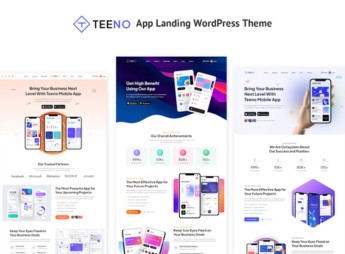
Teeno creates a complete landing page to promote mobile apps, with feature sections, screenshots, pricing plans, and download buttons for the App Store and Google Play. It serves independent developers, startups, and product teams who need to publish their app’s promotional page quickly, with testimonial blocks, frequently asked questions, contact form integration, and an area to insert a demo video of the app.
Main Features of Teeno
- App features section
Gathers the app’s main functions into blocks with icon and text. - Screenshots
Shows real app screens inside phone mockups. - Store buttons
Directs the visitor straight to the App Store and Google Play. - Pricing table
Compares free and paid versions of the app with their features. - FAQ block
Answers common questions about the app’s installation, use, and billing.
Benefits of Teeno
- Faster launch
Reduces the time between finishing the app and publishing the promotional page. - More app downloads
Directs the site’s traffic straight to the app stores. - Credibility with testimonials
Uses real user reviews to reduce hesitation before the download. - No designer needed
Provides a ready-made layout for those without their own design team.
Who Is Teeno For?
- Independent developers launching their first app.
- Startups that need a promotional page before launch.
- Product teams responsible for the app’s institutional page.
- Agencies that build landing pages for clients who own apps.
How to Download Teeno
Teeno is available for download here on Ultrapack. Installation follows the path Appearance > Themes > Add New > Upload Theme, which applies the complete layout as soon as the file is activated. Afterward, just swap the texts, images, and app store links.
An app promotional page is often thrown together in a hurry, on a generic template that doesn’t match the product’s identity. A layout designed specifically for this format, with the right space for screenshots and store buttons, helps the app look more mature from the very first visit.
Frequently asked questions
Is Teeno – App Landing WordPress Theme GPL-licensed?
Yes. Teeno – App Landing WordPress Theme is distributed under the GPL (GNU General Public License). You may legally use, modify and redistribute it on as many sites as you want.
Can I use Teeno – App Landing WordPress Theme on multiple sites?
Yes. You can install Teeno – App Landing WordPress Theme on as many sites as you want. Only automatic updates through Ultrapack Auto Updater have a limit: from 3 to 80 sites, depending on the plan.
How much does Teeno – App Landing WordPress Theme cost at Ultrapack?
Teeno – App Landing WordPress Theme costs US$2.99 as a single purchase, and it is also included in the subscription plans starting at US$12/mo (VIP I).
Does Teeno – App Landing WordPress Theme include updates?
Yes. The current version of Teeno – App Landing WordPress Theme is 1.0.0, published at Ultrapack on Apr 30, 2024. Subscribers update straight from the WordPress dashboard with UAU (Ultrapack Auto Updater).
Is Teeno – App Landing WordPress Theme scanned before publication?
Yes. Every version of Teeno – App Landing WordPress Theme goes through a malware scan (ClamAV and YARA rules, at UltraHub) before it is published.
How to install
Automatic updates: this item is updated by the Ultrapack Auto Updater. With it installed, the new version shows up in your dashboard like any other WordPress update (how to set it up).
The file on this page is the developer’s full package, with documentation, demos and plugins. Do not upload that file to WordPress. The theme comes ready inside it, as a ZIP of its own, and that is the one you upload.
- Download the file
elements-teeno-app-landing-wordpress-theme.zipand extract it on your computer. - Look inside the extracted files for the file
teeno_package/teeno.zip. - In the WordPress dashboard, go to Appearance > Themes > Add New > Upload Theme.
- Select that file and click Install Now.
- Click Activate.
- There is nothing to zip. The ZIP inside the package is already in the format WordPress accepts.
- Uploading the whole package is the most common mistake when installing a theme: WordPress answers that no valid theme was found, and nothing is installed.
- The rest of the package belongs to the author: documentation, demo files and, in some themes, the plugins it asks for during setup.
Stuck on a step? Open a ticket telling us which one you stopped at.


