Description
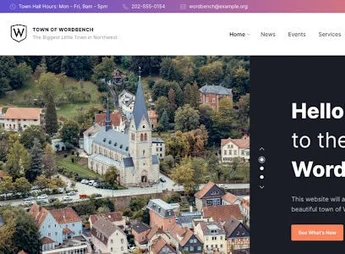
The TownPress is a specialized WordPress theme designed to meet the needs of municipalities, small towns, villages, and local communities. This theme offers a comprehensive set of tools to share essential information, promote local events, and manage community services. With a functional, responsive design, TownPress is the ideal choice for creating a website that serves as your community’s digital information hub.
Key Features
- Custom Design for Municipalities
- Ready-made layouts for displaying local information, news, notices, and public service directories.
- Event and News Management
- Dedicated tools for promoting events and sharing the latest community updates.
- Directory and Service Listings
- Includes sections for presenting departments, emergency contacts, public services, and much more.
- Notice and Alert Integration
- Built-in system for publishing important or emergency announcements, such as traffic changes or weather alerts.
- Responsive and Accessible Design
- Fully responsive and SEO-optimized, ensuring the website is accessible on any device.
- Compatible with Important Plugins
- Works seamlessly with WPML for multilingual websites, Elementor for page customization, and WooCommerce for local service payments, such as fees and registrations.
- Community-Specific Features
- Interactive maps for locating services and points of interest.
- Detailed calendars to keep residents informed about events and meetings.
- Easy Customization
- Offers multiple design and color options, adapting to the visual identity of the municipality or community.
Benefits of TownPress
- Community Information Hub: Ideal for consolidating all information and services in one place.
- Promotes Connection and Transparency: Facilitates communication between the municipal administration and citizens.
- Easy to Use and Manage: Developed to be intuitive, even for users with little WordPress experience.
Who Is It For?
- City halls and municipalities.
- Villages and small towns.
- Community associations and local organizations.
With TownPress, you can create a functional, professional website to strengthen communication and connection between your community and its local administration. It combines elegant design, specific tools, and flexibility to meet the demands of a modern, efficient digital presence.
Frequently asked questions
Is TownPress – Municipality WordPress Theme GPL-licensed?
Yes. TownPress – Municipality WordPress Theme is distributed under the GPL (GNU General Public License). You may legally use, modify and redistribute it on as many sites as you want.
Can I use TownPress – Municipality WordPress Theme on multiple sites?
Yes. You can install TownPress – Municipality WordPress Theme on as many sites as you want. Only automatic updates through Ultrapack Auto Updater have a limit: from 3 to 80 sites, depending on the plan.
How much does TownPress – Municipality WordPress Theme cost at Ultrapack?
TownPress – Municipality WordPress Theme costs US$2.99 as a single purchase, and it is also included in the subscription plans starting at US$12/mo (VIP I).
Does TownPress – Municipality WordPress Theme include updates?
Yes. The current version of TownPress – Municipality WordPress Theme is 3.8.15, published at Ultrapack on Sep 4, 2026. Subscribers update straight from the WordPress dashboard with UAU (Ultrapack Auto Updater).
Is TownPress – Municipality WordPress Theme scanned before publication?
Yes. Every version of TownPress – Municipality WordPress Theme goes through a malware scan (ClamAV and YARA rules, at UltraHub) before it is published.
What changed in this version
Version 3.8.15
- Improved compatibility with WordPress 7.1
- Updated LSVR Framework to 1.9.7
- Changed core files
- style.css, inc/tgm-settings.php, inc/plugins
Version 3.8.14
- Fixed editor styles rendering
- Fixed bug with metadata rendering
- Updated WPBakery Page Builder plugin to 8.7.3
- Changed core files
- style.css, assets, inc/actions.php, inc/editor-custom-colors-template.php, inc/lsvr-directory/actions.php
Version 3.8.13
- Updated LSVR Events to 1.9.8
- Updated LSVR Framework to 1.9.5
- Updated WPBakery Page Builder plugin to 8.7.2
- Changed core files
- style.css, inc/tgm-settings.php, inc/plugins
Version 3.8.12
- Updated WPBakery Page Builder plugin to 8.5
- Changed core files
- style.css
Version 3.8.11
- Fixed issue with missing custom taxonomies and posts in WPBakery Page Builder UI
- Updated LSVR 3rd Party Toolkit to 1.3.2
- Updated WPBakery Page Builder plugin to 8.3.1
- Changed core files
- style.css, inc/tgm-settings.php, inc/plugins
Release notes published by the developer.
How to install
Updates: manual. When a new version comes out, download it on this same page and upload it over the old one; WordPress asks whether you want to replace the current version.
The file on this page is the developer’s full package, with documentation, demos and plugins. Do not upload that file to WordPress. The theme comes ready inside it, as a ZIP of its own, and that is the one you upload.
- Download the file
themeforest-11490395-townpress-municipality-wordpress-theme.zipand extract it on your computer. - Look inside the extracted files for the file
THEME/townpress.zip. - In the WordPress dashboard, go to Appearance > Themes > Add New > Upload Theme.
- Select that file and click Install Now.
- Click Activate.
- There is nothing to zip. The ZIP inside the package is already in the format WordPress accepts.
- Uploading the whole package is the most common mistake when installing a theme: WordPress answers that no valid theme was found, and nothing is installed.
- The rest of the package belongs to the author: documentation, demo files and, in some themes, the plugins it asks for during setup.
- The package also includes the plugin the theme uses, in
js_composer.zip. Upload this file in Plugins > Add New > Upload Plugin after activating the theme. - Ignore the folder
Legacy: they are the previous versions that the author left in the package.
Stuck on a step? Open a ticket telling us which one you stopped at.