

Description
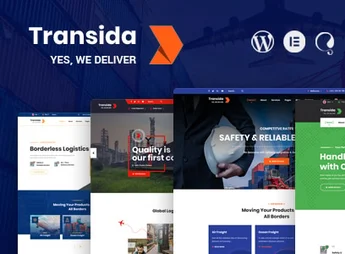
Transida is a premium WordPress theme specifically developed for companies in the logistics, transportation, freight forwarding, and cargo distribution sectors. With a modern, professional look, it is designed for businesses that need to convey trust and efficiency, providing ready-to-use layouts to showcase services, routes, tracking, and operational differentiators in a clear and attractive way for customers.
Main Features
- Ready-Made Logistics Layouts
Multiple prebuild pages tailored for transport, freight, warehousing, and distribution, ready for immediate use. - Visual Drag & Drop Builder
Compatible with drag-and-drop editors, allowing you to build and edit pages without writing a single line of code. - Fully Responsive Design
Adapts seamlessly to desktops, tablets, and smartphones, ensuring a great experience on any screen. - Quotation and Tracking Form
Dedicated elements for requesting quotes and tracking shipments, integrated into the layout. - Customizable Header and Footer
Multiple header and footer variations that can be adjusted to match your company’s identity. - SEO and Speed Optimized
Lightweight structure and clean code that promote fast loading and good search engine rankings.
Benefits of Transida
- Professional Presence
Conveys credibility and solidity, strengthening your freight forwarder’s image in front of customers. - Time Savings
With importable demos in just a few clicks, the site goes live quickly without lengthy development processes. - Easily Managed
The intuitive interface allows updating content, services, and contacts without advanced technical knowledge. - Higher Client Conversion
Call-to-action buttons and strategic forms help capture quotes and new contracts.
Who Is It For?
- Freight forwarders and cargo shipping companies
- Logistics operators, warehouses, and distribution centers
- Delivery, moving, and road transportation services
With Transida, your logistics company gains an elegant, functional site aligned with sector needs. It is the ideal choice for those who want to highlight their transportation services online, attract more customers, and showcase their operations with the professionalism that the market demands.
Frequently asked questions
Is Transida – Transportation & Logistics WordPress Theme GPL-licensed?
Yes. Transida – Transportation & Logistics WordPress Theme is distributed under the GPL (GNU General Public License). You may legally use, modify and redistribute it on as many sites as you want.
Can I use Transida – Transportation & Logistics WordPress Theme on multiple sites?
Yes. You can install Transida – Transportation & Logistics WordPress Theme on as many sites as you want. Only automatic updates through Ultrapack Auto Updater have a limit: from 3 to 80 sites, depending on the plan.
How much does Transida – Transportation & Logistics WordPress Theme cost at Ultrapack?
Transida – Transportation & Logistics WordPress Theme costs US$2.99 as a single purchase, and it is also included in the subscription plans starting at US$12/mo (VIP I).
Does Transida – Transportation & Logistics WordPress Theme include updates?
Yes. The current version of Transida – Transportation & Logistics WordPress Theme is 1.7, published at Ultrapack on Jul 16, 2026. Subscribers update straight from the WordPress dashboard with UAU (Ultrapack Auto Updater).
Is Transida – Transportation & Logistics WordPress Theme scanned before publication?
Yes. Every version of Transida – Transportation & Logistics WordPress Theme goes through a malware scan (ClamAV and YARA rules, at UltraHub) before it is published.
What changed in this version
Version 1.7 2025-03-13
- 1) pagination issue fixed.
Version 1.6 2024-05-30
- 1) PHP Version 8.2.4 Compatibility issues are fixed.
- 2) All Plugins are up to date.
- 3) Color Scheme is added.
Version 1.5 2023-10-19
- 1) All Plugins are up to date.
Version 1.4 2023-01-08
- 1) All Plugins are up to date.
Version 1.3 2022-10-28
- 1) All Plugins are up to date.
Release notes published by the developer.
How to install
Updates: manual. When a new version comes out, download it on this same page and upload it over the old one; WordPress asks whether you want to replace the current version.
The file on this page is the developer’s full package, with documentation, demos and plugins. Do not upload that file to WordPress. The theme comes ready inside it, as a ZIP of its own, and that is the one you upload.
- Download the file
elements-transida-transportation-wordpress-theme.zipand extract it on your computer. - Look inside the extracted files for the file
transida-wp-full/transida.zip. - In the WordPress dashboard, go to Appearance > Themes > Add New > Upload Theme.
- Select that file and click Install Now.
- Click Activate.
- There is nothing to zip. The ZIP inside the package is already in the format WordPress accepts.
- Uploading the whole package is the most common mistake when installing a theme: WordPress answers that no valid theme was found, and nothing is installed.
- The rest of the package belongs to the author: documentation, demo files and, in some themes, the plugins it asks for during setup.
Stuck on a step? Open a ticket telling us which one you stopped at.


