 UAU Ready
Description
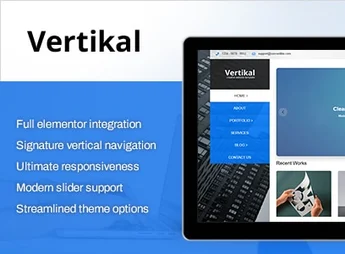
Vertikal allows the creation of institutional websites, portfolios, and online shops, with a permanent vertical fixed sidebar as a signature visual layout element, integrated Elementor builder, and one-click demo imports. It is ideal for businesses, creative agencies, restaurants, clinics, and fashion brands looking for a visually distinct advantage, with custom post types for portfolio, team, and clients, as well as WPML support for multilingual sites.
Main Features of Vertikal
- Permanent vertical fixed sidebar
Fixed vertical navigation sidebar that remains visible while the user scrolls down the page. - Elementor integration
Visual page builder via drag and drop with exclusive theme widgets. - One-click demo imports
Instantly loads ready-made layouts with posts, images, and structured settings. - Custom post types
Includes custom post types for portfolio, team, and clients with dedicated screens. - WooCommerce compatibility
Renders store pages, cart, and checkout with the theme’s style applied.
Benefits of Vertikal
- Distinctive visual identity
Vertical menu stands out from the horizontal standard, immediately highlighting the brand. - Faster setup
Importable demos speed up site launch without building pages one by one. - International reach
_WPML support allows translation of the site into multiple languages without switching themes. - Better search engine readability
_Schema Markup structures page data for clear interpretation by search engines.
Who is Vertikal For?
- Businesses and portfolio holders wanting a layout that deviates from the horizontal standard.
- Restaurants, clinics, studios, and fashion brands highlighting images and visual identity.
- Creative agencies delivering a wide range of projects and wanting to import ready-to-use demos to speed up production.
How to Download Vertikal
Vertikal is available for download here on Ultrapack. After downloading the .zip file, install the theme in Appearance > Themes > Add New > Upload Theme, select the file and activate. The exclusive widgets appear in Elementor immediately after activation, ready for use in constructing the pages.
Vertikal combines the Elementor builder with an uncommon vertical navigation system, positioning itself as a stylistic alternative for projects valuing visual differentiation. The importable demo library covers business niches, gastronomy, health, and creative portfolios, reducing the initial setup work. For sites needing to deviate from the standard corporate template without sacrificing setup convenience, it is a consistent path.
Frequently asked questions
Is Vertikal | Responsive WordPress Theme GPL-licensed?
Yes. Vertikal | Responsive WordPress Theme is distributed under the GPL (GNU General Public License). You may legally use, modify and redistribute it on as many sites as you want.
Can I use Vertikal | Responsive WordPress Theme on multiple sites?
Yes. You can install Vertikal | Responsive WordPress Theme on as many sites as you want. Only automatic updates through Ultrapack Auto Updater have a limit: from 3 to 80 sites, depending on the plan.
How much does Vertikal | Responsive WordPress Theme cost at Ultrapack?
Vertikal | Responsive WordPress Theme costs US$2.99 as a single purchase, and it is also included in the subscription plans starting at US$12/mo (VIP I).
Does Vertikal | Responsive WordPress Theme include updates?
Yes. The current version of Vertikal | Responsive WordPress Theme is 1.0.0, published at Ultrapack on Jun 9, 2026. Subscribers update straight from the WordPress dashboard with UAU (Ultrapack Auto Updater).
Is Vertikal | Responsive WordPress Theme scanned before publication?
Yes. Every version of Vertikal | Responsive WordPress Theme goes through a malware scan (ClamAV and YARA rules, at UltraHub) before it is published.
What are the requirements for the theme Vertikal | Responsive WordPress Theme?
Requires WordPress 5.0 or higher and PHP 7.0 or higher. Tested up to WordPress 6.4.
What changed in this version
Version 1.0.0
- Initial ThemeForest release.
Release notes published by the developer.
How to install
Automatic updates: this item is updated by the Ultrapack Auto Updater. With it installed, the new version shows up in your dashboard like any other WordPress update (how to set it up).
The file on this page is the developer’s full package, with documentation, demos and plugins. Do not upload that file to WordPress. The theme comes ready inside it, as a ZIP of its own, and that is the one you upload.
- Download the file
elements-vertikal-responsive-wordpress-theme.zipand extract it on your computer. - Look inside the extracted files for the file
vertikal wp/vertikal.zip. - In the WordPress dashboard, go to Appearance > Themes > Add New > Upload Theme.
- Select that file and click Install Now.
- Click Activate.
Requirements: Requires WordPress 5.0 or higher and PHP 7.0 or higher. Tested up to WordPress 6.4.
- There is nothing to zip. The ZIP inside the package is already in the format WordPress accepts.
- Uploading the whole package is the most common mistake when installing a theme: WordPress answers that no valid theme was found, and nothing is installed.
- The rest of the package belongs to the author: documentation, demo files and, in some themes, the plugins it asks for during setup.
Stuck on a step? Open a ticket telling us which one you stopped at.