

 UAU Ready
Description
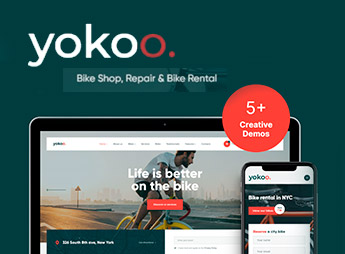
Yokoo is a theme designed for bicycle shops, rental services, and bike tour operators, with the Elementor builder, WooCommerce integration, and multiple ready-made homepages (including the Rental Station demo). The second sentence names what builds bicycle shops and rental stations in WordPress from importable demos, a panel with more than 750 options in the Customizer, and native compatibility with WooCommerce, Contact Form 7, MailChimp for WP, and The Events Calendar.
Yokoo Key Features
- Elementor Builder
Edits pages, header, and footer via drag-and-drop without touching code. - WooCommerce Integration
Supports versions 5.x through 8.x and works with the WOOF product filter. - Ready-made bike demos
Includes homepages such as Home 6, Splash, and Rental Station for quick import. - Panel with 750+ options
Adjusts colors, typography, boxed/fullwidth layout, and blog styles through the Customizer. - Ajax Search and Essential Grid
Filters products without reloading the page and organizes catalogs into dynamic grids.
Yokoo Benefits
- Website live in a few hours
Demo import reduces the initial setup time for the shop or rental station. - Showcase ready for bicycles
Layouts designed for product pages with large photos and model variations. - Editing without a developer
All visual adjustments are handled through the Customizer and Elementor, eliminating the need for technical hiring. - Direct communication with customers
Forms, event calendar, and lead capture for newsletters are already configured.
Who Is Yokoo Recommended For?
- Those who operate a physical bicycle shop and want to bring the catalog to e-commerce with WooCommerce.
- Bicycle rental stations that need to display fleets, plans, and pickup locations.
- City tour operators and guided bike tour providers who sell packages and promote itineraries.
- Repair shops and specialized cycling services that want an online calendar and contact form.
How to Download Yokoo
Yokoo is available for download here on Ultrapack. After downloading the .zip file, install it in Appearance > Themes > Add New > Upload Theme, select the file, and activate it. Then, import one of the demos through the ThemeREX Addons panel to start editing from a ready-made layout.
Built on Elementor and WooCommerce, Yokoo covers the complete cycle for those who work with bicycles: product showcase, rental pages, tour promotion, and lead capture in a single theme. The combination of niche-specific demos, a panel with hundreds of options, and ready-made plugins such as Contact Form 7 and MailChimp for WP shortens the path between purchasing the theme and having the website operating.
Frequently asked questions
Is Yokoo – Bike Shop & Bicycle Rental WordPress Theme GPL-licensed?
Yes. Yokoo – Bike Shop & Bicycle Rental WordPress Theme is distributed under the GPL (GNU General Public License). You may legally use, modify and redistribute it on as many sites as you want.
Can I use Yokoo – Bike Shop & Bicycle Rental WordPress Theme on multiple sites?
Yes. You can install Yokoo – Bike Shop & Bicycle Rental WordPress Theme on as many sites as you want. Only automatic updates through Ultrapack Auto Updater have a limit: from 3 to 80 sites, depending on the plan.
How much does Yokoo – Bike Shop & Bicycle Rental WordPress Theme cost at Ultrapack?
Yokoo – Bike Shop & Bicycle Rental WordPress Theme costs US$2.99 as a single purchase, and it is also included in the subscription plans starting at US$12/mo (VIP I).
Does Yokoo – Bike Shop & Bicycle Rental WordPress Theme include updates?
Yes. The current version of Yokoo – Bike Shop & Bicycle Rental WordPress Theme is 1.1.12, published at Ultrapack on Apr 23, 2026. Subscribers update straight from the WordPress dashboard with UAU (Ultrapack Auto Updater).
Is Yokoo – Bike Shop & Bicycle Rental WordPress Theme scanned before publication?
Yes. Every version of Yokoo – Bike Shop & Bicycle Rental WordPress Theme goes through a malware scan (ClamAV and YARA rules, at UltraHub) before it is published.
How to install
Automatic updates: this item is updated by the Ultrapack Auto Updater. With it installed, the new version shows up in your dashboard like any other WordPress update (how to set it up).
The file on this page is the developer’s full package, with documentation, demos and plugins. Do not upload that file to WordPress. The theme comes ready inside it, as a ZIP of its own, and that is the one you upload.
- Download the file
elements-yokoo.zipand extract it on your computer. - Look inside the extracted files for the file
Yokoo_v1.1.12/yokoo.zip. - In the WordPress dashboard, go to Appearance > Themes > Add New > Upload Theme.
- Select that file and click Install Now.
- Click Activate.
- There is nothing to zip. The ZIP inside the package is already in the format WordPress accepts.
- Uploading the whole package is the most common mistake when installing a theme: WordPress answers that no valid theme was found, and nothing is installed.
- The rest of the package belongs to the author: documentation, demo files and, in some themes, the plugins it asks for during setup.
Stuck on a step? Open a ticket telling us which one you stopped at.



