

 UAU Ready
Description
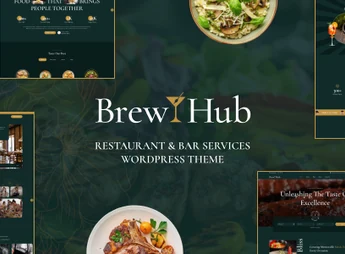
Brewhub is a theme suitable for bars, pubs, restaurants, and coffee shops, featuring a reservation system, menu showcase, and product pages integrated with WooCommerce. Built on Elementor, the theme allows creating menus, reservations, and beverage stores without editing code, using more than 35 custom shortcodes, unlimited headers and footers, and one-click demo import.
Main Features of Brewhub
- Visual building with Elementor
Creates pages by drag and drop, with more than 35 exclusive theme shortcodes. - Menu and reservations
Structures sections for menus, items, prices, and table reservation form. - Store integrated with WooCommerce
Product pages, live search, image zoom, and fixed purchase button. - Unlimited headers and footers
Creates header and footer variations directly with Elementor, without template files. - Blog in multiple styles
Displays posts in list, grid, or masonry, with infinite scroll and load more.
Benefits of Brewhub
- Site live in no time
One-click demo import reduces initial setup work. - Sales beyond the dining area
Combines onsite menu and online sales of beverages, kits, and delivery. - Editing autonomy
Layout and content adjustments remain in the dashboard, without relying on a developer. - Multilingual reach
Compatibility with WPML allows serving foreign visitors in tourist cities.
Who Is Brewhub Recommended For?
- Bars, pubs, and breweries needing to showcase menus, events, and receive online reservations.
- Restaurants, bistros, coffee shops, and bakeries wanting always up-to-date digital menus.
- Those selling beverages, wines, or artisanal products who want a WooCommerce store integrated with the site.
How to Download Brewhub
Brewhub is available for download here at Ultrapack. After downloading the .zip file, install it at Appearance > Themes > Add New > Upload Theme, select the file, and activate. Then, the dashboard displays the demo import wizard and the theme widgets appear in Elementor’s editor.
Combining Elementor, WooCommerce, Contact Form 7, and Events Calendar in a single installation, Brewhub covers everything from menu presentation to closing online orders. For those running a bar, coffee shop, or gastronomic event venue, it is a ready-made base that dispenses with custom development and keeps menu, schedule, and store in the same dashboard.
Frequently asked questions
Is Brewhub – Bar & Restaurant WordPress Theme GPL-licensed?
Yes. Brewhub – Bar & Restaurant WordPress Theme is distributed under the GPL (GNU General Public License). You may legally use, modify and redistribute it on as many sites as you want.
Can I use Brewhub – Bar & Restaurant WordPress Theme on multiple sites?
Yes. You can install Brewhub – Bar & Restaurant WordPress Theme on as many sites as you want. Only automatic updates through Ultrapack Auto Updater have a limit: from 3 to 80 sites, depending on the plan.
How much does Brewhub – Bar & Restaurant WordPress Theme cost at Ultrapack?
Brewhub – Bar & Restaurant WordPress Theme costs US$2.99 as a single purchase, and it is also included in the subscription plans starting at US$12/mo (VIP I).
Does Brewhub – Bar & Restaurant WordPress Theme include updates?
Yes. The current version of Brewhub – Bar & Restaurant WordPress Theme is 1.0.3, published at Ultrapack on Aug 20, 2026. Subscribers update straight from the WordPress dashboard with UAU (Ultrapack Auto Updater).
Is Brewhub – Bar & Restaurant WordPress Theme scanned before publication?
Yes. Every version of Brewhub – Bar & Restaurant WordPress Theme goes through a malware scan (ClamAV and YARA rules, at UltraHub) before it is published.
What are the requirements for the theme Brewhub – Bar & Restaurant WordPress Theme?
Requires WordPress 5.0 or higher and PHP 7.4 or higher. Tested up to WordPress 6.8.
How to install
Automatic updates: this item is updated by the Ultrapack Auto Updater. With it installed, the new version shows up in your dashboard like any other WordPress update (how to set it up).
The file on this page is the developer’s full package, with documentation, demos and plugins. Do not upload that file to WordPress. The theme comes ready inside it, as a ZIP of its own, and that is the one you upload.
- Download the file
elements-brewhub-bar-restaurant-wordpress-theme.zipand extract it on your computer. - Look inside the extracted files for the file
brewhub-1.0.3.zip. - In the WordPress dashboard, go to Appearance > Themes > Add New > Upload Theme.
- Select that file and click Install Now.
- Click Activate.
Requirements: Requires WordPress 5.0 or higher and PHP 7.4 or higher. Tested up to WordPress 6.8.
- There is nothing to zip. The ZIP inside the package is already in the format WordPress accepts.
- Uploading the whole package is the most common mistake when installing a theme: WordPress answers that no valid theme was found, and nothing is installed.
- The rest of the package belongs to the author: documentation, demo files and, in some themes, the plugins it asks for during setup.
- The file
plugins-bundle.zipis not an installable plugin: it's a package. Extract this file and upload each plugin inside it to Plugins > Add New > Upload Plugin.
Stuck on a step? Open a ticket telling us which one you stopped at.



