

 UAU Ready
Description
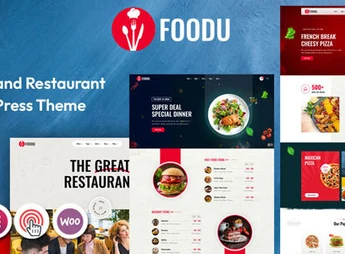
Foodu is a modern and visually appealing WordPress theme, specifically designed for the food industry. Ideal for restaurants, cafés, bistros, bakeries and food bloggers, it offers a robust platform to display menus, manage online reservations and even sell products. With its elegant design and focus on high-quality images, Foodu helps create an online experience that awakens customers’ appetite.
Main Features
- Full Site Editing (FSE): Fully compatible with full-site editing, allowing customization of headers, footers and page templates using the WordPress block editor.
- Custom Gutenberg Blocks: Includes over 25 exclusive Gutenberg blocks, created to meet food business needs, such as menus, galleries and testimonials.
- One-Click Demo Import: Set up your site in minutes with the demo importer, which quickly replicates the chosen template’s layout and content.
- Responsive and Mobile-Optimized Design: Ensures flawless view on all devices, from desktops to smartphones, delivering an excellent user experience.
- WooCommerce Integration: Fully ready for e-commerce, enabling you to sell products, accept online orders and manage deliveries with ease.
- Built-in Reservation System: Compatible with leading reservation plugins so your customers can book a table directly from the site, simply and conveniently.
Foodu Benefits
- Professional Online Presence: Create a site with a sophisticated and appetizing look that reflects your establishment’s quality, attracting and winning more customers.
- Simplified Management: Centralize menu, order, and reservation management in one platform, optimizing operations and saving time.
- No-Code Customization: Thanks to Full Site Editing and Gutenberg blocks, you can visually customize every detail of your site without needing technical or programming knowledge.
- Increased Sales and Reservations: By providing an easy platform for online orders and bookings, you remove barriers for the customer, potentially leading to a direct increase in revenue and occupancy.
Who is it Recommended For?
- Restaurants, bistros, and bars that require an online menu and reservation system.
- Cafés, bakeries, and pastry shops that wish to showcase products and enable online sales.
- Food bloggers and chefs seeking an elegant platform to share recipes and build their brand.
With Foodu, you have all the necessary tools to create a successful culinary website that delights the eye and simplifies business operations.
Frequently asked questions
Is Foodu – Food & Restaurant WordPress Theme GPL-licensed?
Yes. Foodu – Food & Restaurant WordPress Theme is distributed under the GPL (GNU General Public License). You may legally use, modify and redistribute it on as many sites as you want.
Can I use Foodu – Food & Restaurant WordPress Theme on multiple sites?
Yes. You can install Foodu – Food & Restaurant WordPress Theme on as many sites as you want. Only automatic updates through Ultrapack Auto Updater have a limit: from 3 to 80 sites, depending on the plan.
How much does Foodu – Food & Restaurant WordPress Theme cost at Ultrapack?
Foodu – Food & Restaurant WordPress Theme costs US$2.99 as a single purchase, and it is also included in the subscription plans starting at US$12/mo (VIP I).
Does Foodu – Food & Restaurant WordPress Theme include updates?
Yes. The current version of Foodu – Food & Restaurant WordPress Theme is 2.0, published at Ultrapack on May 7, 2026. Subscribers update straight from the WordPress dashboard with UAU (Ultrapack Auto Updater).
Is Foodu – Food & Restaurant WordPress Theme scanned before publication?
Yes. Every version of Foodu – Food & Restaurant WordPress Theme goes through a malware scan (ClamAV and YARA rules, at UltraHub) before it is published.
How to install
Automatic updates: this item is updated by the Ultrapack Auto Updater. With it installed, the new version shows up in your dashboard like any other WordPress update (how to set it up).
The file on this page is the full package the author publishes on the marketplace: the theme, the documentation and sometimes the plugins it uses. Do not upload that file through the dashboard, because WordPress cannot find the theme inside it. What gets installed is the theme folder, which is in there.
- Download the file
elements-foodu-food-restaurant-wordpress-theme.zipand extract it on your computer. - If the extracted package contains another ZIP file named after the theme, extract that ZIP as well before looking for the theme folder.
- Look for the folder that has the
style.cssfile and thescreenshot.pngimage. That is the theme folder. - Zip that folder only. Do not use RAR.
- In the WordPress dashboard, go to Appearance > Themes > Add New > Upload Theme and upload the ZIP file you just created.
- Click Activate.
- Uploading the whole package is the most common mistake when installing a theme. WordPress answers that no valid theme was found, and nothing is installed.
- If after extracting you already find
style.cssandscreenshot.pngin the main folder, that folder is the theme folder. - The rest of the package belongs to the author: documentation, demo files and, in some themes, the plugins it asks for during setup.
Stuck on a step? Open a ticket telling us which one you stopped at.


