 UAU Ready
Description
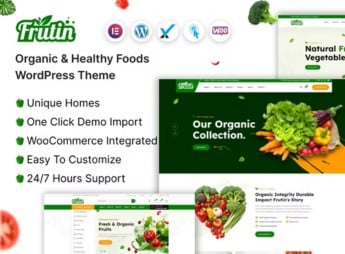
The Frutin theme builds a complete site for anyone selling organic and healthy foods, with ready-made pages for a product catalog, shopping cart, categories by food type and a highlight section for the week’s promotions. It works well for anyone running an organic market, a neighborhood produce stand or a natural products store who needs an online showcase organized by category, with quick search and a simple checkout for the customer to complete the purchase.
Frutin’s Main Features
- Catalog by category
Organizes products into groups such as fruits, vegetables, dairy and grains. - Shopping cart
Lets customers add items and review the order before completing the purchase. - Quick product search
A search field that finds items by name directly in the catalog. - Promotion highlights
A block on the home page to showcase deals and products of the week. - Individual product page
A space with photo, description, origin and detailed price for each item.
Frutin’s Benefits
- Store ready to sell
Shortens the time between installing the theme and opening the store to the public. - Organized navigation
Makes it easier for customers to find the right product among several categories. - A look that conveys trust
The clean appearance reinforces the perceived quality of the products being sold. - Compatible with WooCommerce
Supports online store features without needing an additional plugin to sell.
Who Is Frutin Recommended For?
- Anyone running a market or specialty stand focused on organic and natural products.
- Farmers who sell directly to consumers and want their own online store.
- Distributors of healthy foods who handle box subscriptions or weekly deliveries.
- Anyone who already sells on a marketplace and wants their own site to build customer loyalty.
How to Download Frutin
The Frutin theme is available for download here on Ultrapack. After uploading the file through Appearance > Themes > Add New > Upload Theme, simply activate the theme and set up the catalog, categories and shopping cart according to the products being sold.
A food website lives on conveying freshness and organization from the very first glance, and that’s exactly what the layout aims to deliver. It works both for those opening their first online store and for those who already sell through another channel and need their own space to showcase the full catalog.
Frequently asked questions
Is Frutin – Organic & Healthy Food WordPress Theme GPL-licensed?
Yes. Frutin – Organic & Healthy Food WordPress Theme is distributed under the GPL (GNU General Public License). You may legally use, modify and redistribute it on as many sites as you want.
Can I use Frutin – Organic & Healthy Food WordPress Theme on multiple sites?
Yes. You can install Frutin – Organic & Healthy Food WordPress Theme on as many sites as you want. Only automatic updates through Ultrapack Auto Updater have a limit: from 3 to 80 sites, depending on the plan.
How much does Frutin – Organic & Healthy Food WordPress Theme cost at Ultrapack?
Frutin – Organic & Healthy Food WordPress Theme costs US$2.99 as a single purchase, and it is also included in the subscription plans starting at US$12/mo (VIP I).
Does Frutin – Organic & Healthy Food WordPress Theme include updates?
Yes. The current version of Frutin – Organic & Healthy Food WordPress Theme is 1.0.0, published at Ultrapack on Apr 13, 2024. Subscribers update straight from the WordPress dashboard with UAU (Ultrapack Auto Updater).
Is Frutin – Organic & Healthy Food WordPress Theme scanned before publication?
Yes. Every version of Frutin – Organic & Healthy Food WordPress Theme goes through a malware scan (ClamAV and YARA rules, at UltraHub) before it is published.
How to install
Automatic updates: this item is updated by the Ultrapack Auto Updater. With it installed, the new version shows up in your dashboard like any other WordPress update (how to set it up).
The file on this page is the developer’s full package, with documentation, demos and plugins. Do not upload that file to WordPress. The theme comes ready inside it, as a ZIP of its own, and that is the one you upload.
- Download the file
elements-frutin-organic-healthy-food-wordpress-theme.zipand extract it on your computer. - Look inside the extracted files for the file
frutin.zip. - In the WordPress dashboard, go to Appearance > Themes > Add New > Upload Theme.
- Select that file and click Install Now.
- Click Activate.
- There is nothing to zip. The ZIP inside the package is already in the format WordPress accepts.
- Uploading the whole package is the most common mistake when installing a theme: WordPress answers that no valid theme was found, and nothing is installed.
- The rest of the package belongs to the author: documentation, demo files and, in some themes, the plugins it asks for during setup.
Stuck on a step? Open a ticket telling us which one you stopped at.