 UAU Ready
Description
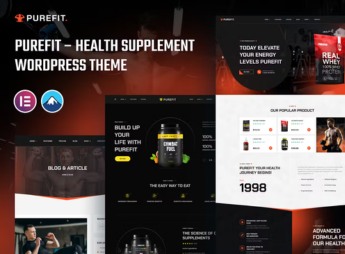
Built with the visual builder Elementor, Purefit allows you to create professional sites for supplement stores, compounding pharmacies, and nutrition clinics. The theme offers ready-to-import demos focused on the fitness and health niche, along with a customization panel that lets you adjust colors, typography, and page layouts for product, service, and blog pages without editing code, making it ideal for those who need a professional online presence with speed and no technical dependency.
Main Features of Purefit
- Ready-to-import demos for the health niche
A set of importable demos aimed at supplement stores, pharmacies, and clinics, with internal pages for products, services, and blogs. - Elementor visual editor
Drag-and-drop page builder that does not require technical knowledge to create custom layouts. - Advanced customization panel
Centralized control of colors, typography, header, and footer, with style options tailored to the fitness segment. - Responsive and optimized layout
Structure that adapts to mobile devices and prioritizes fast loading of images and content. - Integrated blog area
News and article section on health, nutrition, and wellness, with customizable post formats and category grids.
Benefits of Purefit
- Fast online presence
With pre-built demos, you can publish a complete site in a few hours, without a designer. - Professional visual identity
Customization options allow you to adapt colors and fonts to your brand, maintaining visual consistency. - Easy maintenance
The intuitive panel and visual builder simplify content updates, even for those without technical experience. - Health-sector focus
Layouts and features specifically designed for supplement stores and clinics, highlighting products and services.
Who Should Use Purefit?
- Those who sell dietary supplements and want an attractive, user-friendly online store.
- Anyone who runs a compounding pharmacy and needs a site to showcase products and services.
- Nutrition professionals and wellness clinics that want an institutional site with service sections and a blog.
How to Download Purefit
Purefit is available for download here on Ultrapack. After downloading the .zip file, install by navigating to Appearance > Themes > Add New > Upload Theme, select the .zip and activate. The file is complete and ready for immediate installation.
Purefit was specifically built to meet the demands of the health and supplementation sector, combining visual elements that convey trust and modernity. With it, retailers and professionals in the field can present their products and services in an organized way, leveraging Elementor’s flexibility without compromising brand identity.
Frequently asked questions
Is Purefit – Health Supplement WordPress Theme GPL-licensed?
Yes. Purefit – Health Supplement WordPress Theme is distributed under the GPL (GNU General Public License). You may legally use, modify and redistribute it on as many sites as you want.
Can I use Purefit – Health Supplement WordPress Theme on multiple sites?
Yes. You can install Purefit – Health Supplement WordPress Theme on as many sites as you want. Only automatic updates through Ultrapack Auto Updater have a limit: from 3 to 80 sites, depending on the plan.
How much does Purefit – Health Supplement WordPress Theme cost at Ultrapack?
Purefit – Health Supplement WordPress Theme costs US$2.99 as a single purchase, and it is also included in the subscription plans starting at US$12/mo (VIP I).
Does Purefit – Health Supplement WordPress Theme include updates?
Yes. The current version of Purefit – Health Supplement WordPress Theme is 1.0.1, published at Ultrapack on Dec 18, 2024. Subscribers update straight from the WordPress dashboard with UAU (Ultrapack Auto Updater).
Is Purefit – Health Supplement WordPress Theme scanned before publication?
Yes. Every version of Purefit – Health Supplement WordPress Theme goes through a malware scan (ClamAV and YARA rules, at UltraHub) before it is published.
What are the requirements for the theme Purefit – Health Supplement WordPress Theme?
Requires WordPress 5.9 or higher and PHP 5.6 or higher. Tested up to WordPress 6.2.
What changed in this version
Version 1.0.1 2024-04-18
- WooCommerce Bug Fixed
Version 1.0.0 2024-04-18
- First release!
Release notes published by the developer.
How to install
Automatic updates: this item is updated by the Ultrapack Auto Updater. With it installed, the new version shows up in your dashboard like any other WordPress update (how to set it up).
The file on this page is the full package the author publishes on the marketplace: the theme, the documentation and sometimes the plugins it uses. Do not upload that file through the dashboard, because WordPress cannot find the theme inside it. What gets installed is the theme folder, which is in there.
- Download the file
elements-purefit-health-supplement-wordpress-theme.zipand extract it on your computer. - If the extracted package contains another ZIP file named after the theme, extract that ZIP as well before looking for the theme folder.
- Look for the folder that has the
style.cssfile and thescreenshot.pngimage. That is the theme folder. - Zip that folder only. Do not use RAR.
- In the WordPress dashboard, go to Appearance > Themes > Add New > Upload Theme and upload the ZIP file you just created.
- Click Activate.
Requirements: Requires WordPress 5.9 or higher and PHP 5.6 or higher. Tested up to WordPress 6.2.
- Uploading the whole package is the most common mistake when installing a theme. WordPress answers that no valid theme was found, and nothing is installed.
- If after extracting you already find
style.cssandscreenshot.pngin the main folder, that folder is the theme folder. - The rest of the package belongs to the author: documentation, demo files and, in some themes, the plugins it asks for during setup.
Stuck on a step? Open a ticket telling us which one you stopped at.