

 UAU Ready
Description
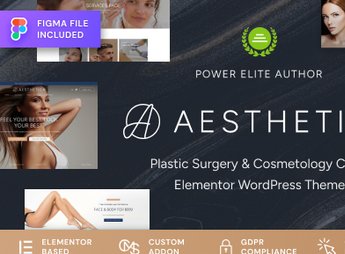
Aesthetica builds websites for plastic surgery, aesthetics, and spa clinics on WordPress, with pages dedicated to procedures, medical staff, before-and-after results, testimonials, and consultation scheduling. It serves whoever manages an aesthetics clinic or plastic surgery practice and needs to convey trust to people researching a procedure online, with a clean, professional look, even before the first contact or an in-person consultation is booked.
Aesthetica’s Main Features
- Before-and-after gallery
Compares result photos by procedure in its own visual block. - Pages per procedure
Details each treatment offered by the clinic on a separate page. - Medical staff profile
Presents the background and specialty of each doctor or clinic professional. - Scheduling form
Receives consultation or evaluation requests directly through the site, with no phone call needed. - Patient testimonials
Displays reviews and accounts from people who have already gone through the procedure at the clinic.
Aesthetica’s Benefits
- More trust before the consultation
Shows real results and staff credentials before the first contact. - Fewer unnecessary phone calls
Makes procedure information and general pricing available directly on the site. - Visual style aligned with the industry
Avoids a generic theme that doesn’t match the aesthetics industry’s standard. - More bookings through the site
Makes the first step easier for whoever has already decided to look for a procedure.
Who Is Aesthetica For?
- Whoever manages a plastic surgery or aesthetics clinic.
- Whoever runs a spa or aesthetic treatment center.
- Whoever works as a dermatologist or surgeon and wants their own online presence.
- Whoever already has a physical clinic and needs a site to capture consultations.
How to Download Aesthetica
Aesthetica is available for download here on Ultrapack. After getting the file, install it through Appearance > Themes > Add New > Upload Theme in the WordPress dashboard and activate the theme to apply the layout to the site.
In an industry where the decision depends on visual trust, having result photos, a staff profile, and a clear path to scheduling makes a difference even before the first contact with the clinic.
Frequently asked questions
Is Aesthetica – Plastic Surgery & Beauty Clinic WordPress Theme GPL-licensed?
Yes. Aesthetica – Plastic Surgery & Beauty Clinic WordPress Theme is distributed under the GPL (GNU General Public License). You may legally use, modify and redistribute it on as many sites as you want.
Can I use Aesthetica – Plastic Surgery & Beauty Clinic WordPress Theme on multiple sites?
Yes. You can use Aesthetica – Plastic Surgery & Beauty Clinic WordPress Theme on multiple sites. The number of sites connected to Ultrapack Auto Updater is limited by your plan.
How much does Aesthetica – Plastic Surgery & Beauty Clinic WordPress Theme cost at Ultrapack?
Aesthetica – Plastic Surgery & Beauty Clinic WordPress Theme costs US$2.99 as a single purchase, and it is also included in the subscription plans starting at US$12/mo (VIP I).
Does Aesthetica – Plastic Surgery & Beauty Clinic WordPress Theme include updates?
Yes. The current version of Aesthetica – Plastic Surgery & Beauty Clinic WordPress Theme is 1.1.0, published at Ultrapack on Feb 24, 2025. Subscribers update straight from the WordPress dashboard with UAU (Ultrapack Auto Updater).
Is Aesthetica – Plastic Surgery & Beauty Clinic WordPress Theme scanned before publication?
Yes. Every version of Aesthetica – Plastic Surgery & Beauty Clinic WordPress Theme goes through a malware scan (ClamAV and YARA rules, at UltraHub) before it is published.
What are the requirements for the theme Aesthetica – Plastic Surgery & Beauty Clinic WordPress Theme?
Requires PHP 7.4 or higher. Tested up to WordPress 6.6.
What changed in this version
Version 1.1.0 2025-01-22
- Tweak: Improve importer.
- Tweak: Improve security.
- Bug Fix: Fixed translations in theme.
Version 1.0.4 2024-12-26
- Tweak: Improved demo content import process.
- Bug Fix: Fixed responsive for latest events.
- Bug Fix: Fixed elementor editor for user roles.
- Bug Fix: Fixed Forminator post types registration.
Version 1.0.3 2024-10-22
- Tweak: Added logger for theme.
- Tweak: Optimized installer.
- Tweak: Optimized scripts running.
- Tweak: Replaced unsafe methods.
- Tweak: Added message for plugins page in installer.
- Bug Fix: Fixed plugins redirection on installation.
Version 1.0.2 2024-10-09
- Tweak: Add possibility to loading installation log.
- Bug Fix: Fixed duplication on import.
Release notes published by the developer.
How to install
Automatic updates: this item is updated by the Ultrapack Auto Updater. With it installed, the new version shows up in your dashboard like any other WordPress update (how to set it up).
The file on this page is the developer’s full package, with documentation, demos and plugins. Do not upload that file to WordPress. The theme comes ready inside it, as a ZIP of its own, and that is the one you upload.
- Download the file
elements-aesthetica-beauty-clinic-wordpress-theme.zipand extract it on your computer. - Look inside the extracted files for the file
aesthetica.zip. - In the WordPress dashboard, go to Appearance > Themes > Add New > Upload Theme.
- Select that file and click Install Now.
- Click Activate.
Requirements: Requires PHP 7.4 or higher. Tested up to WordPress 6.6.
- There is nothing to zip. The ZIP inside the package is already in the format WordPress accepts.
- Uploading the whole package is the most common mistake when installing a theme: WordPress answers that no valid theme was found, and nothing is installed.
- The rest of the package belongs to the author: documentation, demo files and, in some themes, the plugins it asks for during setup.
- The package also includes the plugin the theme uses, in
revslider.zip. Upload this file in Plugins > Add New > Upload Plugin after activating the theme.
Stuck on a step? Open a ticket telling us which one you stopped at.


