

 UAU Ready
Description
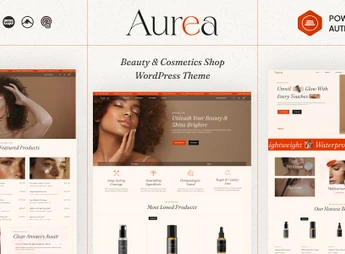
The Aurea theme is ideal for cosmetics, perfume, and skincare brand stores, with WooCommerce catalog ready to sell makeup, perfumes, and beauty products, instant product search and countdown timer on offers. Elementor builder with more than 35 custom shortcodes, unlimited header and footer builder, and one-click demo import reduce store setup to only a few hours, no programming.
Key Features of Aurea
- Compatibility with Elementor
More than 35 exclusive shortcodes expand the drag-and-drop visual editor. - Unlimited headers and footers
Custom builder allows creating header and footer variations per page. - Live product search
Results appear while visitors type, without page reload. - WooCommerce store features
Sticky add-to-cart button, image zoom, load more, and infinite scroll in catalog. - One-click demo import
Sample content is fully installed and serves as the basis for editing.
Benefits of Aurea
- Launch store quickly
The imported demo already provides page structure, menus, and storefront set up. - Higher conversion at checkout
Sticky purchase button and countdown shorten the path to the order. - Large catalog without friction
Infinite scroll and MegaMenu organize hundreds of items in just a few clicks. - International reach
WPML compatibility opens the storefront to audiences in multiple countries.
Who Is Aurea For?
- Those who sell cosmetics, makeup, perfumes, or skincare products in their own store.
- Spas, salons, and aesthetic clinics that also market care lines.
- Those who already use WooCommerce and want a storefront with instant search and an offer showcase.
- Those who need to publish workshop and event schedules alongside the catalog.
How to Download Aurea
The Aurea is available for download here on Ultrapack. After downloading the .zip file, go to Appearance > Themes > Add New > Upload Theme, select the file and activate. With the theme active, the demo import assistant appears in the panel to load the sample content.
Beauty brands need a visual storefront and a short purchase flow at the same time. Aurea combines these two sides: the visual part is handled in Elementor, with custom shortcodes and header builder, while the commercial part relies on WooCommerce, with live search, offer countdowns, and a sticky purchase button on the product page.
Add WPML and Events Calendar support, and the same installation serves catalog, workshop schedule, and another language version, without needing a developer for each layout adjustment.
Frequently asked questions
Is Aurea – Beauty Cosmetic WordPress Theme GPL-licensed?
Yes. Aurea – Beauty Cosmetic WordPress Theme is distributed under the GPL (GNU General Public License). You may legally use, modify and redistribute it on as many sites as you want.
Can I use Aurea – Beauty Cosmetic WordPress Theme on multiple sites?
Yes. You can install Aurea – Beauty Cosmetic WordPress Theme on as many sites as you want. Only automatic updates through Ultrapack Auto Updater have a limit: from 3 to 80 sites, depending on the plan.
How much does Aurea – Beauty Cosmetic WordPress Theme cost at Ultrapack?
Aurea – Beauty Cosmetic WordPress Theme costs US$2.99 as a single purchase, and it is also included in the subscription plans starting at US$12/mo (VIP I).
Does Aurea – Beauty Cosmetic WordPress Theme include updates?
Yes. The current version of Aurea – Beauty Cosmetic WordPress Theme is 1.0.2, published at Ultrapack on Aug 21, 2026. Subscribers update straight from the WordPress dashboard with UAU (Ultrapack Auto Updater).
Is Aurea – Beauty Cosmetic WordPress Theme scanned before publication?
Yes. Every version of Aurea – Beauty Cosmetic WordPress Theme goes through a malware scan (ClamAV and YARA rules, at UltraHub) before it is published.
What are the requirements for the theme Aurea – Beauty Cosmetic WordPress Theme?
Requires WordPress 5.0 or higher and PHP 7.4 or higher. Tested up to WordPress 6.8.
How to install
Automatic updates: this item is updated by the Ultrapack Auto Updater. With it installed, the new version shows up in your dashboard like any other WordPress update (how to set it up).
The file on this page is the developer’s full package, with documentation, demos and plugins. Do not upload that file to WordPress. The theme comes ready inside it, as a ZIP of its own, and that is the one you upload.
- Download the file
elements-aurea-beauty-cosmetics-wordpress-theme.zipand extract it on your computer. - Look inside the extracted files for the file
aurea-1.0.2.zip. - In the WordPress dashboard, go to Appearance > Themes > Add New > Upload Theme.
- Select that file and click Install Now.
- Click Activate.
Requirements: Requires WordPress 5.0 or higher and PHP 7.4 or higher. Tested up to WordPress 6.8.
- There is nothing to zip. The ZIP inside the package is already in the format WordPress accepts.
- Uploading the whole package is the most common mistake when installing a theme: WordPress answers that no valid theme was found, and nothing is installed.
- The rest of the package belongs to the author: documentation, demo files and, in some themes, the plugins it asks for during setup.
- The file
Plugins-bundle.zipis not an installable plugin: it's a package. Extract this file and upload each plugin inside it to Plugins > Add New > Upload Plugin.
Stuck on a step? Open a ticket telling us which one you stopped at.



