 UAU Ready
Description
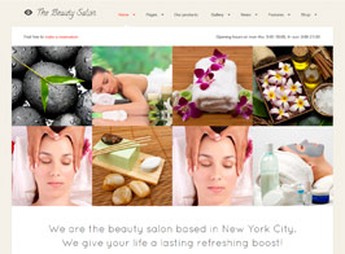
The Beauty Salon is a theme aimed at beauty salons, spas, and aesthetic studios, featuring a service gallery, appointment schedule, and professional profiles. Built for WordPress, it organizes treatment pages, price tables, and team areas from importable demos, eliminating the need for code editing to launch the site with a visual identity aligned with the wellness sector.
Main Features of The Beauty Salon
- Importable beauty demos
Ready layouts focused on salons, spas, and aesthetic centers installed in just a few clicks. - Service catalog
Structured pages to showcase treatments, descriptions, photos, and price tables. - Schedule and bookings
Support for forms and calendars to receive appointment requests directly through the site. - Team profiles
Dedicated area to present professionals, specialties, and each one’s social networks. - Customization panel
Control over colors, typography, and header types adjusted via WordPress customizer.
Benefits of The Beauty Salon
- Identity aligned with the niche
Clean and feminine aesthetic already tailored to the beauty and wellness sector. - Website live quickly
Demo import and panel adjustments reduce the time between installation and publication. - More bookings through the site
Service catalog and booking form guide visitors to real contact. - Autonomy without a developer
Color, typography, and block customizations made by the salon owner themselves.
Who Is The Beauty Salon Recommended For?
- Beauty salons, barbershops, and aesthetic studios that want their own online presence.
- Spas, day spas, and wellness centers needing to present treatments and packages.
- Those offering hair, nails, massage, or facial aesthetic services who want to receive online bookings.
How to Download The Beauty Salon
The Beauty Salon is available for download here at Ultrapack. After saving the .zip file, install it via Appearance > Themes > Add New > Upload Theme, select the package, and activate it. Then, import the desired demo through the theme panel to start editing pages, services, and the team.
Aimed at the beauty and wellness universe, The Beauty Salon gathers what a salon needs to sell services online: treatment showcase, professional profiles, price table, and booking channel. The combination of ready demos with a customization panel shortens the path between purchasing the theme and having the site published, without depending on a developer for every brand adjustment.
Frequently asked questions
Is The Beauty Salon GPL-licensed?
Yes. The Beauty Salon is distributed under the GPL (GNU General Public License). You may legally use, modify and redistribute it on as many sites as you want.
Can I use The Beauty Salon on multiple sites?
Yes. You can install The Beauty Salon on as many sites as you want. Only automatic updates through Ultrapack Auto Updater have a limit: from 3 to 80 sites, depending on the plan.
How much does The Beauty Salon cost at Ultrapack?
The Beauty Salon costs US$2.99 as a single purchase, and it is also included in the subscription plans starting at US$12/mo (VIP I).
Does The Beauty Salon include updates?
Yes. The current version of The Beauty Salon is 3.1, published at Ultrapack on Jul 26, 2017. Subscribers update straight from the WordPress dashboard with UAU (Ultrapack Auto Updater).
Is The Beauty Salon scanned before publication?
Yes. Every version of The Beauty Salon goes through a malware scan (ClamAV and YARA rules, at UltraHub) before it is published.
How to install
Automatic updates: this item is updated by the Ultrapack Auto Updater. With it installed, the new version shows up in your dashboard like any other WordPress update (how to set it up).
The file on this page is already the theme, ready to upload to WordPress.
- Download the file
themeforest-2676012-the-beauty-salon-wordpress-theme.zip. - In the WordPress dashboard, go to Appearance > Themes > Add New > Upload Theme.
- Select the file
themeforest-2676012-the-beauty-salon-wordpress-theme.zipand click Install Now. - Click Activate.
- If WordPress answers that no valid theme was found, the file is the developer’s full package and the theme is in a folder inside it. Extract the file on your computer, look for the folder that has
style.cssandscreenshot.png(in this item, the folderthe-beauty-salon), zip that folder only and upload it again.
Stuck on a step? Open a ticket telling us which one you stopped at.