UAU Ready
Description
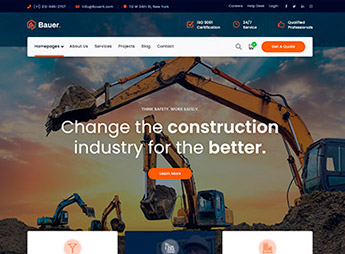
Constructzine structures institutional sites for construction companies, engineering firms and corporate services, organizing presentation pages, service areas, contact calls and editorial content within WordPress. As a Themeisle line theme, it functions as a visual base for those who need to publish a professional presence in the construction sector, with layout, color, menu and widget adjustments without relying on manual site reconstruction.
Main Features of Constructzine
- Corporate layout
Organizes company, services and contact pages in an institutional structure. - Construction focus
Adapts the visual for projects, renovations, engineering and related sectors. - Visual customization
Allows adjusting colors, menus and theme areas through WordPress. - Editorial content
Supports publishing news, articles and company updates. - Responsive structure
Accommodates navigation on desktop, tablet and mobile screens.
Benefits of Constructzine
- Clearer presence
Helps visitors understand services, operational areas and contact information. - Faster publishing
Reduces the time to set up an institutional WordPress site. - Consistent identity
Maintains pages, menus and content within the same visual standard. - No-code use
Facilitates basic adjustments via the panel for non-technical teams.
Who is Constructzine Recommended for?
- Construction companies that need to showcase projects, services and contact channels on an institutional site.
- Engineering firms that wish to organize corporate pages with visual language aligned to the sector.
- Those who provide renovation, maintenance or construction services and want to publish content on WordPress.
How to Download Constructzine
The Constructzine is available for download here on Ultrapack. After downloading the .zip file, install it in Appearance > Themes > Add New > Upload Theme, select the package and activate it through the WordPress dashboard. The file is ready for installation via the standard theme workflow.
Constructzine serves projects that require an institutional base focused on the construction sector, without relying on complex structures or unnecessary external resources. Its proposal is to organize company presentation, services, content and contact in a direct theme, suitable for corporate sites that value clarity, simple maintenance and objective navigation.
Frequently asked questions
Is Themeisle Constructzine WordPress Theme GPL-licensed?
Yes. Themeisle Constructzine WordPress Theme is distributed under the GPL (GNU General Public License). You may legally use, modify and redistribute it on as many sites as you want.
Can I use Themeisle Constructzine WordPress Theme on multiple sites?
Yes. You can install Themeisle Constructzine WordPress Theme on as many sites as you want. Only automatic updates through Ultrapack Auto Updater have a limit: from 3 to 80 sites, depending on the plan.
How much does Themeisle Constructzine WordPress Theme cost at Ultrapack?
Themeisle Constructzine WordPress Theme costs US$2.99 as a single purchase, and it is also included in the subscription plans starting at US$12/mo (VIP I).
Does Themeisle Constructzine WordPress Theme include updates?
Yes. The current version of Themeisle Constructzine WordPress Theme is 1.1.12, published at Ultrapack on May 12, 2018. Subscribers update straight from the WordPress dashboard with UAU (Ultrapack Auto Updater).
Is Themeisle Constructzine WordPress Theme scanned before publication?
Yes. Every version of Themeisle Constructzine WordPress Theme goes through a malware scan (ClamAV and YARA rules, at UltraHub) before it is published.
What changed in this version
Version 1.1.12 May 11, 2018
- Compatibility with the Orbit Fox plugin
Version 1.1.11 Dec 15, 2017
- Added a new option in Homepage Settings called 'Keep the old static frontpage template?' to allow a static frontpage
- Fixed problem with testimonials limited number
Version 1.1.9 Apr 10, 2017
- Added a home sidebar
Version 1.1.8 Oct 12, 2016
- Update version
Version 1.1.7 Oct 12, 2016
- Improved layout for the comments section
Release notes published by the developer.
How to install
Automatic updates: this item is updated by the Ultrapack Auto Updater. With it installed, the new version shows up in your dashboard like any other WordPress update (how to set it up).
The file on this page is already the theme, ready to upload to WordPress.
- Download the file
constructzine.zip. - In the WordPress dashboard, go to Appearance > Themes > Add New > Upload Theme.
- Select the file
constructzine.zipand click Install Now. - Click Activate.
- If WordPress answers that no valid theme was found, the file is the developer’s full package and the theme is in a folder inside it. Extract the file on your computer, look for the folder that has
style.cssandscreenshot.png, zip that folder only and upload it again.
Stuck on a step? Open a ticket telling us which one you stopped at.