 UAU Ready
Description
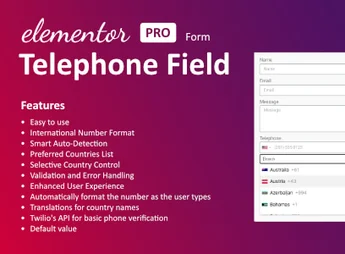
Telephone Field for Elementor Form adds a custom telephone field to Elementor forms, allowing for automatic formatting and country code selection. With it, users can enter phone numbers in a standardized way, improving usability and form validation. Ideal for websites that require accuracy in collecting contact information.
Key Features
- Easy to install and use:
The plugin can be installed and configured in a few steps, without requiring technical knowledge. - Compatibility:
Works flawlessly with any theme built with Elementor. - Automatic country code insertion:
The plugin automatically detects the country code based on the visitor’s IP. - Manual fill option:
Users can manually enter the country code if they prefer. - Phone number validation:
The plugin validates phone numbers to ensure data accuracy. - Support and updates:
Receive quality support and regular updates to keep the plugin functioning properly.
Benefits of Elementor Form – International Telephone plugin
- Improves user interaction: Enhances the user experience when filling out forms.
- Accurate data collection: Number validation ensures correct information is collected.
- Time optimization: Automatic country code filling saves the user’s time.
For Whom It’s Recommended?
- Web designers using Elementor to build sites.
- Site administrators looking to optimize contact information collection.
- Marketing professionals seeking accurate data collection for future campaigns.
Simplifying the collection and validation of phone numbers, this addon enhances form functionality in Elementor. With support for international formatting and customization, it is a practical solution for those seeking efficiency in contact capture.
Frequently asked questions
Is Telephone Field for Elementor form GPL-licensed?
Yes. Telephone Field for Elementor form is distributed under the GPL (GNU General Public License). You may legally use, modify and redistribute it on as many sites as you want.
Can I use Telephone Field for Elementor form on multiple sites?
Yes. You can install Telephone Field for Elementor form on as many sites as you want. Only automatic updates through Ultrapack Auto Updater have a limit: from 3 to 80 sites, depending on the plan.
How much does Telephone Field for Elementor form cost at Ultrapack?
Telephone Field for Elementor form costs US$2.99 as a single purchase, and it is also included in the subscription plans starting at US$12/mo (VIP I).
Does Telephone Field for Elementor form include updates?
Yes. The current version of Telephone Field for Elementor form is 1.3.0, published at Ultrapack on Mar 11, 2025. Subscribers update straight from the WordPress dashboard with UAU (Ultrapack Auto Updater).
Is Telephone Field for Elementor form scanned before publication?
Yes. Every version of Telephone Field for Elementor form goes through a malware scan (ClamAV and YARA rules, at UltraHub) before it is published.
How to install
Automatic updates: this item is updated by the Ultrapack Auto Updater. With it installed, the new version shows up in your dashboard like any other WordPress update (how to set it up).
The file on this page is the developer’s full package, documentation included. Do not upload that file through the dashboard: WordPress answers that the package does not contain a valid plugin. The plugin comes ready inside it, as a ZIP of its own, and that is the one you upload.
- Download the file
elements-telephone-field-for-elementor-form.zipand extract it on your computer. - Look inside the extracted files for the file
Main/WordPress/elementor-form-international-telephone-field.zip. - In the WordPress dashboard, go to Plugins > Add New > Upload Plugin.
- Select that file, click Install Now and then Activate.
- There is nothing to zip. The ZIP inside the package is already in the format WordPress accepts.
- The rest of the package belongs to the author: documentation, license and sometimes sample files. None of that is installed through the dashboard.
Stuck on a step? Open a ticket telling us which one you stopped at.