 UAU Ready
Description
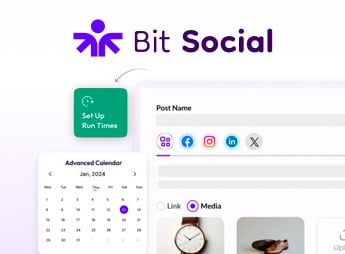
Bit Social Pro automatically publishes your content to thirteen social networks the moment a post goes live, connecting accounts directly in the WordPress dashboard and keeping its own calendar for scheduling. Built for anyone running a blog, portal, or WooCommerce store who needs to maintain a constant presence without copying and pasting post after post, the plugin brings together account connections, a scheduling queue, and old content reuse in one place.
Key Features of Bit Social Pro
- Publishing to thirteen social networks
Sends posts to Facebook, X, Instagram, Pinterest, LinkedIn, Tumblr, Telegram, and other connected accounts. - Scheduler with built-in calendar
Organizes campaigns and distributes posts at the times you set. - AI-generated text and images
Creates captions, summaries, and images to go with each automatic share. - Automatic WooCommerce product promotion
Promotes store items on connected networks as they enter the catalog. - Old content resharing
Revives already-published posts to keep profiles constantly active.
Benefits of Bit Social Pro
- Less manual work per post
The same content reaches multiple profiles without opening each network separately. - Predictable posting frequency
The scheduled queue keeps up the posting pace even during busy weeks. - Work concentrated in the WordPress dashboard
Accounts, queue, and history stay accessible without switching between platforms. - Greater use of your content library
Old posts drive social traffic again without producing anything new.
Who Is Bit Social Pro For?
- Anyone who publishes frequently on a blog or portal and wants every post to reach social networks automatically.
- Anyone selling on WooCommerce who needs to promote products on social networks without building each post by hand.
- You, if you manage communication for multiple profiles and need a posting queue and calendar in a single dashboard.
- Anyone who wants to reuse already-published content to keep profiles active between launches.
How to Download Bit Social Pro
Bit Social Pro is available for download here on Ultrapack. Step-by-step instructions for installing this file are in the How to install tab, next to the description. Once activated, the account connection screens and the scheduling calendar appear in the admin dashboard menu.
Social media automation usually runs into two snags: connecting the accounts and keeping up the posting frequency. Bit Social Pro handles both right inside WordPress, with a direct connection to the thirteen supported networks and a scheduling queue laid out on a calendar.
For anyone publishing content regularly, blogs, niche portals, and WooCommerce catalogs, the practical result is a posting routine that keeps running even when nobody is watching the schedule that day.
Frequently asked questions
Is Bit Social Pro GPL-licensed?
Yes. Bit Social Pro is distributed under the GPL (GNU General Public License). You may legally use, modify and redistribute it on as many sites as you want.
Can I use Bit Social Pro on multiple sites?
Yes. You can install Bit Social Pro on as many sites as you want. Only automatic updates through Ultrapack Auto Updater have a limit: from 3 to 80 sites, depending on the plan.
How much does Bit Social Pro cost at Ultrapack?
Bit Social Pro costs US$2.99 as a single purchase, and it is also included in the subscription plans starting at US$12/mo (VIP I).
Does Bit Social Pro include updates?
Yes. The current version of Bit Social Pro is 1.19.0, published at Ultrapack on Sep 17, 2026. Subscribers update straight from the WordPress dashboard with UAU (Ultrapack Auto Updater).
Is Bit Social Pro scanned before publication?
Yes. Every version of Bit Social Pro goes through a malware scan (ClamAV and YARA rules, at UltraHub) before it is published.
What are the requirements for the plugin Bit Social Pro?
Requires WordPress 5.1 or higher and PHP 7.4 or higher. Tested up to WordPress 7.0.
What changed in this version
Version 1.19.0
- Features
- Auto Post: Newly published posts now wait until their publish data has fully settled before sharing, so taxonomy filters, custom fields and classic meta-box saves are all included in the auto-post.
- Improvements
- Auto Post: A delayed rule still counts from the actual publish time even when the share waits for the post's data to finish saving.
- Scheduling: Delayed auto-post events are no longer spaced apart during cron catch-up, so multiple due rules for the same post can all publish on time without pushing back other schedules.
- Auto Post: Block editor follow-up saves no longer cause shares to miss their final taxonomy terms or meta values.
- Auto Post (Pro): Delayed auto-post schedules now keep their intended publish-time timing even when a post matches multiple delayed rules.
Version 1.18.0
- Features
- Logs: The Logs screen is rebuilt around publish runs — one line per run with its date, schedule, post, type and tally, expanding into a card per account with the status, the one line worth reading and the raw platform response behind a button.
- Logs: Added a search box and Type and Missed filters, and a schedule row now links straight to its own runs.
- Logs: Every missed post is now recorded and retryable — a slot lost to a late or dormant cron leaves the same trail as any other failure, and can be retried per account or for the whole run. The retry in progress is shown and the other retry buttons are held until it comes back.
- Schedules & Share Now: Rows expand to show where a schedule posts and what it posts — accounts, groups and post filters — without opening the edit modal.
- Settings → Cron: New Cron Status panel showing whether WP-Cron is working, when it last ran and when Bit Social's next event is due, with an Overdue warning.
- Settings → Cron (Pro): New Late post handling — decide separately for delayed Auto Posts and for Share Now and scheduled shares whether a late post is published anyway or marked as Missed, with the window set in minutes, hours or days. Free runs on a fixed one-hour window.
- Notifications (Pro): New “Email on missed post” alert with its own toggle and “Last sent” line, sent to the same recipients as the failure alert. One email lists every post written off in a sweep.
- Accounts: An account whose token could not be renewed now says “Reconnect needed” on its card, with the reason and how long it has been failing, instead of looking healthy while every publish fails.
- Accounts (Pro): Reconnect now opens the account picker, listing every account the sign-in returned with the one being reconnected highlighted, instead of working behind a sticky toast that could never finish.
- Social Templates: Templates auto-save with an inline Saving / Saved / Unsaved status beside the platform heading, replacing a toast per keystroke.
- Share Now: Added a “See logs” button to each row, and row actions now keep a fixed column.
- Auto Post: A single-post row shows why it cannot be re-scheduled instead of leaving the action column empty.
- Improvements
- Cron catch-up: After downtime, overdue one-shot posts are re-queued five minutes apart instead of firing in one burst that trips platform rate limits and spam heuristics.
- Missed slots: A recurring schedule that loses a slot anchors the next one to the slot it lost, so an outage costs one slot instead of walking the whole timetable forward.
- Schedules, Share Now & Logs: The tables now fit the admin screen at every width instead of running off the right edge; dates read as a day with the time below it, and columns thin out on narrower screens.
- Stability: Screens are wrapped in error boundaries, so a single failure shows a recoverable message instead of a blank page.
- Updates: The log backfill this release needs runs in small batches in the background, so a site with a large log table is not held up by the first request after updating.
- Scheduling: A recurring schedule that fell behind dumped its whole backlog at once. Overdue runs are realigned instead.
- Facebook & Instagram: Every Meta Graph call is pinned to one current API version. Token renewal had been running against versions Meta no longer serves, so connections quietly aged out and posting stopped with nothing changed on the site.
- Instagram (Pro): Accounts connected before Instagram Login can be reconnected again — they were matched by an id that flow never sees, so users were wrongly told they had signed in with the wrong account.
- LinkedIn: Profiles are keyed by their stable member id instead of the display name, and a failed token refresh no longer overwrites the stored token.
- Instagram, Pinterest, TikTok & Threads (Pro): Refreshed tokens are now actually saved (Instagram, Pinterest), TikTok's rotated refresh token is kept, and Threads' refresh endpoint URL was malformed so every refresh failed — each of these killed the connection at the original token's expiry.
- X (Twitter) & Google Business Profile (Pro): The stored refresh token is kept unless the platform rotates it, token-exchange errors are surfaced, and a Google account with no business locations now gets a clear message.
- Accounts: A failed connection no longer leaves the account picker on “Fetching data, please wait…” forever, and the reason is shown in the modal instead of a toast that scrolls away.
- Accounts: A connection that fails at the network level now says the site's server could not reach the platform, rather than showing a raw cURL error.
- Accounts: The connect popup's handover back to the plugin was unreliable — a successful authorization could be dropped, and an abandoned attempt could be picked up by the next connect.
- Logs: Retrying a failed post now updates the row it was retried from on every platform, instead of adding a second row on five of them.
- Logs: An auto post to several accounts reads as one run rather than one event per account.
- Logs: The screen filled debug.log with a PHP deprecation every three seconds for as long as it was left open.
- Schedules: A delayed auto-post is attributed to the post's author instead of reading “Unknown”.
- Share Now: A run's log names its content “Custom written content” rather than “No post”.
- Settings: The External Cron toggle snapped back silently when the stored Pro settings had no cron branch.
- Social Templates: Malformed stored template data no longer crashes the template settings screen.
Version 1.17.1
- Templates: The LinkedIn template screen went blank on some setups when the custom message was left empty. Post previews now trim long text without breaking the page.
Version 1.17.0
- Features
- Roles & Access (Pro): New Roles & Access settings tab to control which WordPress roles can open the Bit Social dashboard and menu. Administrators always keep full access.
- Roles & Access (Pro): Per-account permissions — restrict which roles may publish through each connected account, enforced on Auto Post, Schedules and Share Now.
- Accounts (Pro): Reconnect an existing account in place — tokens are refreshed without creating a duplicate, so its schedules and permissions stay intact.
- Accounts: New account details modal with account info, connected/last updated timestamps and per-account role permissions.
- Logs: The Logs table now shows the platform logo and the account avatar for each entry.
- Logs, Schedules & Share Now: New “Created by” column showing who created each item, along with their role.
- Improvements
- Account Groups: Redesigned the group list as cards with proper dark-theme colours, clearer rename/add/delete actions and real empty states.
- Accounts: Switching between the Accounts and Groups tabs is now instant instead of rebuilding the page and refetching everything.
- Facebook: Pages stopped publishing roughly 50 days after being connected because page tokens were needlessly run through the token exchange; refreshed tokens are now also saved correctly. A page that has already stopped publishing needs to be reconnected once — the stored token cannot be repaired.
- Tumblr: Token refreshes are serialized so concurrent publishes no longer fail with 401 errors.
- Bluesky & X (Twitter): Publishing no longer fails on hosts where the optional fileinfo or mbstring PHP extensions are disabled, and Bluesky link/mention offsets are correct for non-ASCII text.
- Google Business Profile: Stopped refreshing the access token on every publish.
- Pro: Enforced nonce validation on Pro AJAX requests.
- Auto Post: Preserved the existing free-version behaviour for non-admin authors so their posts keep auto-posting.
- Accounts: The delete confirmation now shows which account is being removed and no longer appears behind the modal.
Version 1.16.0
- Features
- Instagram: Connect Instagram accounts directly via Instagram Login instead of the legacy Facebook Login flow — no linked Facebook Page required.
- Pro: Corrected the free-version requirement check in the Pro plugin updater.
Release notes published by the developer.
How to install
Automatic updates: this item is updated by the Ultrapack Auto Updater. With it installed, the new version shows up in your dashboard like any other WordPress update (how to set it up).
- Download the file
bit-social-pro.zip. - In the WordPress dashboard, go to Plugins > Add New > Upload Plugin.
- Select the file
bit-social-pro.zipand click Install Now. - Click Activate.
Requirements: Requires WordPress 5.1 or higher and PHP 7.4 or higher. Tested up to WordPress 7.0.
Stuck on a step? Open a ticket telling us which one you stopped at.