

 UAU Ready
Description
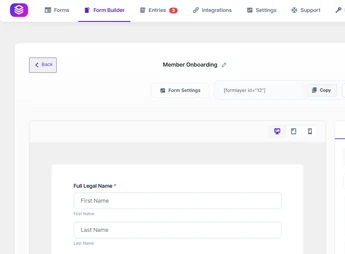
FormLayer Pro builds drag-and-drop forms in the WordPress dashboard, processes submissions via AJAX without reloading the page, and forwards each response to Mailchimp, Slack, Discord, Google Sheets, Notion, or Trello. Phone fields with validation, file upload, star rating, and password expand the forms, while hCaptcha, Cloudflare Turnstile, and reCAPTCHA filter spam for those collecting quotes, registrations, and contacts directly on the site.
Main Features of FormLayer Pro
- Visual field builder
Positions and reorders fields by dragging on the screen, with live form preview. - Asynchronous AJAX submission
Records visitor responses without reloading the site page. - Integrations with external services
Forwards data to Mailchimp, Slack, Discord, Google Sheets, Notion, and Trello. - Extended field types
Includes validated phone, file upload, star rating, and password field. - Configurable anti-spam barrier
Validates each submission with hCaptcha, Cloudflare Turnstile, or reCAPTCHA before saving.
Benefits of FormLayer Pro
- Form published the same day
Ready-made templates and visual editing remove the need to hire a developer for each adjustment. - Data already in the right place
Eliminates manually copying responses to spreadsheets, email lists, or team channels. - Clean inbox
Automated submissions are blocked before becoming false notifications or records. - Consistent reading on mobile
Device checking prevents broken fields during filling.
Who is FormLayer Pro for?
- Those who receive quote requests via the site and want alerts sent to Slack or Discord.
- Clinics, schools, and gyms that work with registrations, screening, and scheduling via forms.
- Also aimed at those who already use Mailchimp and wish to feed the list directly from the contact form.
How to Download FormLayer Pro
FormLayer Pro is available for download here on Ultrapack. After saving the .zip file, go to Plugins > Add New > Upload Plugin, select the package, and activate it. Upon activation, the builder and submissions list appear in the WordPress dashboard side menu.
Among WordPress form builders, FormLayer Pro stands out by combining visual editing, asynchronous submission, and data output to the tools the team already uses daily, from spreadsheets to messaging channels. Those relying on forms to capture demand close the cycle: the visitor fills out, the record is saved in the dashboard, and the alert reaches someone who really monitors it.
Frequently asked questions
Is FormLayer Pro GPL-licensed?
Yes. FormLayer Pro is distributed under the GPL (GNU General Public License). You may legally use, modify and redistribute it on as many sites as you want.
Can I use FormLayer Pro on multiple sites?
Yes. You can install FormLayer Pro on as many sites as you want. Only automatic updates through Ultrapack Auto Updater have a limit: from 3 to 80 sites, depending on the plan.
How much does FormLayer Pro cost at Ultrapack?
FormLayer Pro costs US$2.99 as a single purchase, and it is also included in the subscription plans starting at US$12/mo (VIP I).
Does FormLayer Pro include updates?
Yes. The current version of FormLayer Pro is 1.0.8, published at Ultrapack on Aug 24, 2026. Subscribers update straight from the WordPress dashboard with UAU (Ultrapack Auto Updater).
Is FormLayer Pro scanned before publication?
Yes. Every version of FormLayer Pro goes through a malware scan (ClamAV and YARA rules, at UltraHub) before it is published.
How to install
Automatic updates: this item is updated by the Ultrapack Auto Updater. With it installed, the new version shows up in your dashboard like any other WordPress update (how to set it up).
- Download the file
formlayer-pro.zip. - In the WordPress dashboard, go to Plugins > Add New > Upload Plugin.
- Select the file
formlayer-pro.zipand click Install Now. - Click Activate.
Stuck on a step? Open a ticket telling us which one you stopped at.


