UAU Ready
Description
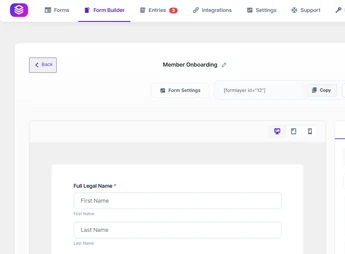
Built for WordPress, Piotnet Forms Pro creates visual forms with drag-and-drop fields, conditional logic, post-submission actions, and PDF generation attached to email, allowing submitted data to be mapped to documents and transactional messages. It serves those who need to build contact, quote, registration, payment, or lead capture forms without relying on manual code at every step of the flow.
Key Features of Piotnet Forms Pro
- Visual form builder
Create fields, sections, and buttons through a visual editor. - Conditional logic
Show, hide, or fill fields based on visitor responses. - PDF generation
Convert submissions into PDF files attached to email messages. - Multi-step forms
Organize long questions into screens with navigation buttons. - Submission database
Log submissions in the dashboard for later data review.
Benefits of Piotnet Forms Pro
- Clearer flows
Splits lengthy forms into steps that are easy to fill out. - Less manual work
Turns responses into emails and PDFs without repetitive editing. - More precise capture
Shows relevant fields based on each submitted response. - Dashboard control
Keeps submissions accessible within the WordPress admin.
Who Is Piotnet Forms Pro For?
- Anyone who needs to build quote forms with conditional fields and response calculations.
- You, if you use WordPress pages to capture leads, registrations, or business inquiries.
- Teams that send confirmations, simple contracts, or receipts as PDFs after a form is filled out.
How to Download Piotnet Forms Pro
Piotnet Forms Pro is available for download here on Ultrapack. After downloading the .zip file, go to Plugins > Add New > Upload Plugin, select the package, and activate it in the WordPress dashboard. After activation, configure the forms through the plugin’s menu.
Piotnet Forms Pro fits sites that depend on more elaborate forms than a simple contact field. With conditional logic, post-submission actions, submission logging, and document generation, it helps turn visitor responses into organized processes within WordPress, keeping flow creation accessible for those working directly in the dashboard.
Frequently asked questions
Is Piotnet Forms Pro GPL-licensed?
Yes. Piotnet Forms Pro is distributed under the GPL (GNU General Public License). You may legally use, modify and redistribute it on as many sites as you want.
Can I use Piotnet Forms Pro on multiple sites?
Yes. You can install Piotnet Forms Pro on as many sites as you want. Only automatic updates through Ultrapack Auto Updater have a limit: from 3 to 80 sites, depending on the plan.
How much does Piotnet Forms Pro cost at Ultrapack?
Piotnet Forms Pro costs US$2.99 as a single purchase, and it is also included in the subscription plans starting at US$12/mo (VIP I).
Does Piotnet Forms Pro include updates?
Yes. The current version of Piotnet Forms Pro is 2.1.42, published at Ultrapack on Jun 17, 2026. Subscribers update straight from the WordPress dashboard with UAU (Ultrapack Auto Updater).
Is Piotnet Forms Pro scanned before publication?
Yes. Every version of Piotnet Forms Pro goes through a malware scan (ClamAV and YARA rules, at UltraHub) before it is published.
How to install
Automatic updates: this item is updated by the Ultrapack Auto Updater. With it installed, the new version shows up in your dashboard like any other WordPress update (how to set it up).
- Download the file
piotnetforms-pro.zip. - In the WordPress dashboard, go to Plugins > Add New > Upload Plugin.
- Select the file
piotnetforms-pro.zipand click Install Now. - Click Activate.
- This item is already activated. If any screen asks for a license, enter any code; any email works in the email field.
Stuck on a step? Open a ticket telling us which one you stopped at.