 UAU Ready
Description
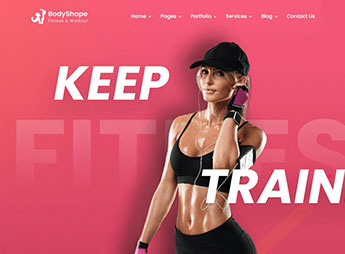
BodyShape builds gym websites in WordPress with layouts dedicated to classes, training schedules, and instructor profiles, bringing together internal pages for services, enrollment plans, and a health blog. Aimed at gyms, fitness studios, and personal trainers, the theme structures the entire digital presence of the business with a visual identity centered on weight training, performance, and wellness.
Main Features
- Fitness-focused layouts
Internal pages designed for gyms, crossfit, weight training, and training studios. - Scheduling system
Visual structure for class schedules, training sessions, and appointment booking. - Instructor profiles
Dedicated areas to showcase trainers, specialties, and offered modalities. - Plan and enrollment table
Comparison blocks for monthly, annual, and class package options. - Responsive design
Automatic adaptation for phones, tablets, and desktops, with legible typography on any screen.
Benefits of BodyShape
- Ready-to-use niche identity
Visual already aligned to the fitness universe, eliminating heavy design adjustments. - Direct student acquisition
Structure focused on converting visitors into enrollments and appointments. - Accelerated deployment
Pre-built pages reduce the time between installation and site publication. - Clear brand communication
Highlighting schedules, modalities, and staff, organizing information students look for.
Who Is It Recommended For?
- Gyms, crossfit boxes, and weight training studios.
- Personal trainers, physical educators, and fitness coaches.
- Pilates centers, yoga studios, martial arts, and functional training.
- Health professionals, nutritionists, and wellness experts linked to sports performance.
Designed for the fitness sector, BodyShape combines theme-based layouts, scheduling areas, and instructor showcases on a flexible WordPress foundation. The proposal covers both complete gyms and independent professionals, organizing classes, plans, and contact in one place, with a visual consistent with the world of sports and high-intensity physical training.
Frequently asked questions
Is BodyShape – Fitness, Workout & Gym WordPress Theme GPL-licensed?
Yes. BodyShape – Fitness, Workout & Gym WordPress Theme is distributed under the GPL (GNU General Public License). You may legally use, modify and redistribute it on as many sites as you want.
Can I use BodyShape – Fitness, Workout & Gym WordPress Theme on multiple sites?
Yes. You can install BodyShape – Fitness, Workout & Gym WordPress Theme on as many sites as you want. Only automatic updates through Ultrapack Auto Updater have a limit: from 3 to 80 sites, depending on the plan.
How much does BodyShape – Fitness, Workout & Gym WordPress Theme cost at Ultrapack?
BodyShape – Fitness, Workout & Gym WordPress Theme costs US$2.99 as a single purchase, and it is also included in the subscription plans starting at US$12/mo (VIP I).
Does BodyShape – Fitness, Workout & Gym WordPress Theme include updates?
Yes. The current version of BodyShape – Fitness, Workout & Gym WordPress Theme is 1.2, published at Ultrapack on Dec 19, 2025. Subscribers update straight from the WordPress dashboard with UAU (Ultrapack Auto Updater).
Is BodyShape – Fitness, Workout & Gym WordPress Theme scanned before publication?
Yes. Every version of BodyShape – Fitness, Workout & Gym WordPress Theme goes through a malware scan (ClamAV and YARA rules, at UltraHub) before it is published.
How to install
Automatic updates: this item is updated by the Ultrapack Auto Updater. With it installed, the new version shows up in your dashboard like any other WordPress update (how to set it up).
The file on this page is the developer’s full package, with documentation, demos and plugins. Do not upload that file to WordPress. The theme comes ready inside it, as a ZIP of its own, and that is the one you upload.
- Download the file
elements-bodyshape-fitness-workout-gym-wordpress-theme.zipand extract it on your computer. - Look inside the extracted files for the file
BodyShape_FullPackage/Theme Install/bodyshape.zip. - In the WordPress dashboard, go to Appearance > Themes > Add New > Upload Theme.
- Select that file and click Install Now.
- Click Activate.
- There is nothing to zip. The ZIP inside the package is already in the format WordPress accepts.
- Uploading the whole package is the most common mistake when installing a theme: WordPress answers that no valid theme was found, and nothing is installed.
- The rest of the package belongs to the author: documentation, demo files and, in some themes, the plugins it asks for during setup.
Stuck on a step? Open a ticket telling us which one you stopped at.