 UAU Ready
Description
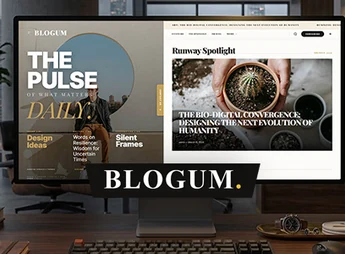
Blogum is a modern and versatile WordPress theme, built with Full Site Editing (FSE) technology to give you total control over your site’s design. Ideal for news portals, online magazines, personal blogs, and content creators, it blends a clean, elegant look with optimized performance. Create a professional, responsive site intuitively using WordPress’s native block editor.
Main Features
- Full Site Editing (FSE)
Edit every part of your site, including headers and footers, directly in the block editor. - Responsive and Modern Design
Delivers a flawless viewing experience on all devices, from desktops to smartphones. - Optimized for Speed and SEO
Clean code structure for quick loading and better search engine rankings. - One-click Demo Import
Get your site up and running in no time by importing demo content with a single click. - Ready Block Patterns
Use pre-built layouts and sections to add complex content easily and quickly. - RTL and Translation Support
Fully compatible with right-to-left languages (RTL) and ready to translate.
Benefits of Blogum
- Intuitive Customization
With Full Site Editing, you have creative freedom to build a unique site without any coding required. - Reader Engagement
The content-focused layout and clear navigation keep visitors engaged longer. - Superior Performance
A fast site improves user experience and contributes to higher Google rankings. - Rapid Launch
Demos and block patterns let you publish your site in record time, hassle-free.
Who Is It For?
- News portals and digital magazines.
- Bloggers and content creators.
- Publishers and agencies looking for a flexible and modern solution.
With its focus on performance, flexibility, and content design, Blogum is the ideal choice for anyone looking to create an impactful online presence. Elevate your digital project with a powerful, user-friendly platform built on the latest WordPress technologies to ensure a solid and scalable future.
Frequently asked questions
Is Blogum — Newspaper, Blog & Magazine WordPress Theme GPL-licensed?
Yes. Blogum — Newspaper, Blog & Magazine WordPress Theme is distributed under the GPL (GNU General Public License). You may legally use, modify and redistribute it on as many sites as you want.
Can I use Blogum — Newspaper, Blog & Magazine WordPress Theme on multiple sites?
Yes. You can install Blogum — Newspaper, Blog & Magazine WordPress Theme on as many sites as you want. Only automatic updates through Ultrapack Auto Updater have a limit: from 3 to 80 sites, depending on the plan.
How much does Blogum — Newspaper, Blog & Magazine WordPress Theme cost at Ultrapack?
Blogum — Newspaper, Blog & Magazine WordPress Theme costs US$2.99 as a single purchase, and it is also included in the subscription plans starting at US$12/mo (VIP I).
Does Blogum — Newspaper, Blog & Magazine WordPress Theme include updates?
Yes. The current version of Blogum — Newspaper, Blog & Magazine WordPress Theme is 1.2.0, published at Ultrapack on Aug 19, 2026. Subscribers update straight from the WordPress dashboard with UAU (Ultrapack Auto Updater).
Is Blogum — Newspaper, Blog & Magazine WordPress Theme scanned before publication?
Yes. Every version of Blogum — Newspaper, Blog & Magazine WordPress Theme goes through a malware scan (ClamAV and YARA rules, at UltraHub) before it is published.
What are the requirements for the theme Blogum — Newspaper, Blog & Magazine WordPress Theme?
Requires WordPress 6.3 or higher and PHP 8.0 or higher. Tested up to WordPress 7.0.
How to install
Automatic updates: this item is updated by the Ultrapack Auto Updater. With it installed, the new version shows up in your dashboard like any other WordPress update (how to set it up).
The file on this page is the developer’s full package, with documentation, demos and plugins. Do not upload that file to WordPress. The theme comes ready inside it, as a ZIP of its own, and that is the one you upload.
- Download the file
elements-blogum.zipand extract it on your computer. - Look inside the extracted files for the file
Blogum_1.2_WP_Package/blogum_1.2.zip. - In the WordPress dashboard, go to Appearance > Themes > Add New > Upload Theme.
- Select that file and click Install Now.
- Click Activate.
Requirements: Requires WordPress 6.3 or higher and PHP 8.0 or higher. Tested up to WordPress 7.0.
- There is nothing to zip. The ZIP inside the package is already in the format WordPress accepts.
- Uploading the whole package is the most common mistake when installing a theme: WordPress answers that no valid theme was found, and nothing is installed.
- The rest of the package belongs to the author: documentation, demo files and, in some themes, the plugins it asks for during setup.
Stuck on a step? Open a ticket telling us which one you stopped at.