 UAU Ready
Description
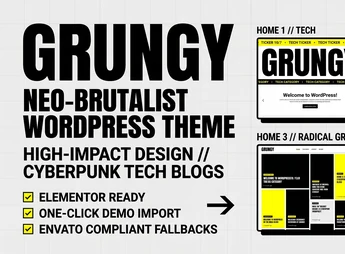
Grungy is a theme created for tech blogs, digital magazines, and creative publications, with a neo-brutalist aesthetic, thick borders, high-contrast typography, and uniform card grids. The theme structures the blog layout with Elementor, featuring a ticker with recent news headlines in the header, a dynamic read time counter on cards, and a multi-style header editor via WordPress Customizer.
Main Features of Grungy
- Elementor integration
Allow you to build pages and internal sections using the visual builder without editing code. - Header news ticker
Rotates headlines in a isolated band at the top of the site. - Read time calculator
Calculates and displays the estimated duration of each post in the card listing. - Multi-style header engine
Switch between header layouts directly through WordPress Customizer. - One-click demo installer
Imports sample content and recreates the original layout structure.
Benefits of Grungy
- Strong visual identity
The neo-brutalist style differentiates the blog from conventional editorial layouts. - Organized publishing from the start
The importable demo reduces the time between installing the theme and publishing content. - Always-aligned grids
The summary handling keeps the card lines uniform, even with uneven text. - Comfortable mobile reading
The mobile-first architecture adapts grid, typography, and menus to small screens.
Who Should Use Grungy?
- Those who post content on technology, artificial intelligence, and development.
- Digital magazines and independent publications that need grid layouts and highlighted headlines.
- You if you run a personal or creative blog and want a look that’s off-the-beaten-path from standard editorial themes.
- Those who already use Elementor and want a theme with factory-styled core and Gutenberg widgets.
How to Download Grungy
The Grungy is available for download here on Ultrapack. After saving the .zip file, go to Appearance > Themes > Add New > Upload Theme, select the package, and activate the theme. After activation, the header and ticker options appear in the Customizer, and the demo installer becomes accessible in the dashboard.
With prepped translation-ready code, compatibility with Contact Form 7, and optimization for the Gutenberg editor, the theme serves well for those maintaining frequent publishing and needing consistency between home, archives, and individual posts. The result is a blog with a strong graphic personality, controlled by native WordPress and Elementor panels, without relying on manual CSS adjustments for each new section.
Frequently asked questions
Is Grungy – Neo – Brutalist Blog WordPress Theme GPL-licensed?
Yes. Grungy – Neo – Brutalist Blog WordPress Theme is distributed under the GPL (GNU General Public License). You may legally use, modify and redistribute it on as many sites as you want.
Can I use Grungy – Neo – Brutalist Blog WordPress Theme on multiple sites?
Yes. You can install Grungy – Neo – Brutalist Blog WordPress Theme on as many sites as you want. Only automatic updates through Ultrapack Auto Updater have a limit: from 3 to 80 sites, depending on the plan.
How much does Grungy – Neo – Brutalist Blog WordPress Theme cost at Ultrapack?
Grungy – Neo – Brutalist Blog WordPress Theme costs US$2.99 as a single purchase, and it is also included in the subscription plans starting at US$12/mo (VIP I).
Does Grungy – Neo – Brutalist Blog WordPress Theme include updates?
Yes. The current version of Grungy – Neo – Brutalist Blog WordPress Theme is 1.0.0, published at Ultrapack on Aug 23, 2026. Subscribers update straight from the WordPress dashboard with UAU (Ultrapack Auto Updater).
Is Grungy – Neo – Brutalist Blog WordPress Theme scanned before publication?
Yes. Every version of Grungy – Neo – Brutalist Blog WordPress Theme goes through a malware scan (ClamAV and YARA rules, at UltraHub) before it is published.
What are the requirements for the theme Grungy – Neo – Brutalist Blog WordPress Theme?
Requires WordPress 6.0 or higher and PHP 7.4 or higher. Tested up to WordPress 7.
What changed in this version
Version 1.0.0
- Initial development production release.
Release notes published by the developer.
How to install
Automatic updates: this item is updated by the Ultrapack Auto Updater. With it installed, the new version shows up in your dashboard like any other WordPress update (how to set it up).
The file on this page is the developer’s full package, with documentation, demos and plugins. Do not upload that file to WordPress. The theme comes ready inside it, as a ZIP of its own, and that is the one you upload.
- Download the file
elements-grungy-neo-brutalist-blog-wordpress-theme.zipand extract it on your computer. - Look inside the extracted files for the file
grungy.zip. - In the WordPress dashboard, go to Appearance > Themes > Add New > Upload Theme.
- Select that file and click Install Now.
- Click Activate.
Requirements: Requires WordPress 6.0 or higher and PHP 7.4 or higher. Tested up to WordPress 7.
- There is nothing to zip. The ZIP inside the package is already in the format WordPress accepts.
- Uploading the whole package is the most common mistake when installing a theme: WordPress answers that no valid theme was found, and nothing is installed.
- The rest of the package belongs to the author: documentation, demo files and, in some themes, the plugins it asks for during setup.
Stuck on a step? Open a ticket telling us which one you stopped at.