UAU Ready
Description
Hermes is a WordPress theme focused on hotels, resorts, and inns, featuring room galleries, an online booking system, and a contact form with an integrated map. It also serves corporate companies and hospitality businesses that need to showcase accommodations, rates, and services in an institutional layout, with ready inner pages to highlight amenities, guest testimonials, and promotional packages.
Main Features of Hermes
- Room and accommodation gallery
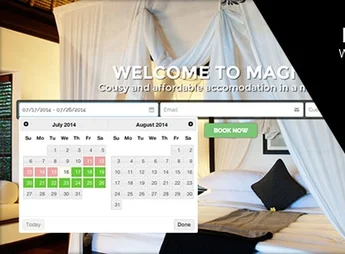
Dedicated pages to display rooms with photos, description, amenities, and rates. - Online booking system
Availability inquiry form with date selection, room type, and number of guests. - Institutional corporate layout
Inner pages for company, services, team, and contact with a professional look aimed at hospitality. - Adaptive responsive design
Structure adjusted for phones, tablets, and desktops maintaining comfortable reading of information. - Visual customization panel
Color, typography, header, and footer adjustments without the need to manually edit code.
Benefits of Hermes
- Professional presentation of the establishment
Conveys credibility to guests with a clean layout focused on booking conversion. - Direct booking capture
Reduces reliance on intermediaries by receiving requests through the hotel’s own website. - Fast website launch
Ready pages for rooms, services, and contact shorten the time between installation and publication. - Consistent visual identity
Typography, colors, and spacing coordinated across all pages of the establishment.
Who Is Hermes Recommended For?
- Hotels, resorts, and inns that want to showcase accommodations and rates on their own site.
- Hospitality companies needing an institutional portal with a room gallery and booking form.
- Those managing tourism enterprises aiming to reduce reliance on external platforms for inquiries.
- Small hotel chains and bed & breakfasts seeking a ready-to-use corporate layout.
How to Download Hermes
Hermes is available for download here on Ultrapack. After saving the .zip file, install it by accessing Appearance > Themes > Add New > Upload theme, select the package, and click activate. Then, import the demo through the theme panel to reproduce the original layout and start editing the establishment’s content.
With a focus on hospitality and corporate tourism, Hermes brings together the essential blocks to put a lodging business online without relying on a developer for each adjustment. The combination of room gallery, booking form, and institutional pages covers everything from family inns to medium-sized resorts that need a strong online presence oriented towards conversion.
Frequently asked questions
Is Hermes – Business Corporate Resort and Hotel GPL-licensed?
Yes. Hermes – Business Corporate Resort and Hotel is distributed under the GPL (GNU General Public License). You may legally use, modify and redistribute it on as many sites as you want.
Can I use Hermes – Business Corporate Resort and Hotel on multiple sites?
Yes. You can install Hermes – Business Corporate Resort and Hotel on as many sites as you want. Only automatic updates through Ultrapack Auto Updater have a limit: from 3 to 80 sites, depending on the plan.
How much does Hermes – Business Corporate Resort and Hotel cost at Ultrapack?
Hermes – Business Corporate Resort and Hotel costs US$2.99 as a single purchase, and it is also included in the subscription plans starting at US$12/mo (VIP I).
Does Hermes – Business Corporate Resort and Hotel include updates?
Yes. The current version of Hermes – Business Corporate Resort and Hotel is 2.0, published at Ultrapack on Apr 28, 2016. Subscribers update straight from the WordPress dashboard with UAU (Ultrapack Auto Updater).
Is Hermes – Business Corporate Resort and Hotel scanned before publication?
Yes. Every version of Hermes – Business Corporate Resort and Hotel goes through a malware scan (ClamAV and YARA rules, at UltraHub) before it is published.
How to install
Automatic updates: this item is updated by the Ultrapack Auto Updater. With it installed, the new version shows up in your dashboard like any other WordPress update (how to set it up).
The file on this page is already the theme, ready to upload to WordPress.
- Download the file
themeforest-272347-hermes-for-business-corporate-resort-and-hotelreviews.zip. - In the WordPress dashboard, go to Appearance > Themes > Add New > Upload Theme.
- Select the file
themeforest-272347-hermes-for-business-corporate-resort-and-hotelreviews.zipand click Install Now. - Click Activate.
- If WordPress answers that no valid theme was found, the file is the developer’s full package and the theme is in a folder inside it. Extract the file on your computer, look for the folder that has
style.cssandscreenshot.png(in this item, the folderHermes), zip that folder only and upload it again.
Stuck on a step? Open a ticket telling us which one you stopped at.