

 UAU Ready
Description
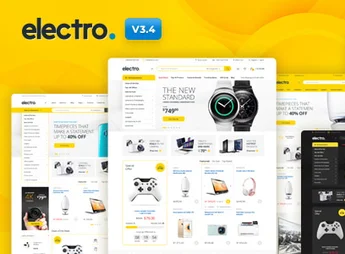
Electro delivers a complete WooCommerce online store built for electronics retail, with 17 home page layouts, 12 header styles, a responsive mega menu, and three distinct single product page layouts. Compatible with Elementor and WPBakery, it integrates ready-to-use multivendor marketplace features via Dokan, WC Vendors, and WCFM, serving everything from standalone stores to platforms with multiple sellers.
Key Features
- 17 ready-made home pages
Home page variations covering everything from a single store to marketplace models and Amazon affiliate templates. - Advanced real-time search
Live search in the header with category filters, returning products as the customer types. - Electro Extensions plugin
Proprietary bundle that adds a mega menu, product carousels, specification tabs, accessories, and a store directory. - Built-in comparison and wishlist
Direct integration with YITH WooCompare and YITH Wishlist, plus a custom product comparison page. - Multivendor support
Layouts compatible with Dokan, WC Vendors, WCFM, and Webkul Marketplace for running electronics marketplaces. - Visual builders
Editable pages in Elementor and WPBakery Page Builder, with 17 built-in templates ready to import.
Electro Benefits
- Fast store launch
Dummy data import reproduces one of the demos in just a few clicks, shortening initial setup. - Multivendor operation without rework
A ready connector for Dokan and WCFM lets you migrate your catalog to a marketplace without switching themes. - Conversion for large catalogs
Filters, comparison, and specification tabs help customers decide among dozens of technical SKUs. - Flexible visual identity
Nine color schemes and twelve headers cover different retail segments without custom CSS.
Who Is It For?
- Online stores for electronics, computers, audio, and appliances on WooCommerce.
- Entrepreneurs building multivendor marketplaces with Dokan, WC Vendors, or WCFM.
- Amazon affiliate sites focused on curation and comparison of electronic products.
- Agencies that need to deliver large-catalog e-commerce sites on tight deadlines.
Built for digital electronics retail, Electro combines the WooCommerce foundation with proprietary components (Electro Extensions) and multivendor integrations, covering everything from a single retailer to platforms with dozens of sellers. The presence of comparison, wishlist, and technical tabs reinforces its use in product catalogs with many specification variations, where the customer compares before buying.
Frequently asked questions
Is Electro – Electronics Store WooCommerce Theme GPL-licensed?
Yes. Electro – Electronics Store WooCommerce Theme is distributed under the GPL (GNU General Public License). You may legally use, modify and redistribute it on as many sites as you want.
Can I use Electro – Electronics Store WooCommerce Theme on multiple sites?
Yes. You can install Electro – Electronics Store WooCommerce Theme on as many sites as you want. Only automatic updates through Ultrapack Auto Updater have a limit: from 3 to 80 sites, depending on the plan.
How much does Electro – Electronics Store WooCommerce Theme cost at Ultrapack?
Electro – Electronics Store WooCommerce Theme costs US$2.99 as a single purchase, and it is also included in the subscription plans starting at US$12/mo (VIP I).
Does Electro – Electronics Store WooCommerce Theme include updates?
Yes. The current version of Electro – Electronics Store WooCommerce Theme is 3.7.2, published at Ultrapack on Sep 18, 2026. Subscribers update straight from the WordPress dashboard with UAU (Ultrapack Auto Updater).
Is Electro – Electronics Store WooCommerce Theme scanned before publication?
Yes. Every version of Electro – Electronics Store WooCommerce Theme goes through a malware scan (ClamAV and YARA rules, at UltraHub) before it is published.
What changed in this version
Version 3.7.2 2026-09-16
- Feature : WordPress 7.1 compatible
- Feature : WooCommerce 11.1.0 compatible
- Fix : A fatal error when OCDI import is active.
Version 3.7.1 2026-09-09
- Feature : WooCommerce 11.x compatible
- Update : Replaced deprecated WooCommerce calls - woocommerce_reset_loop with wc_reset_loop and update_woocommerce_term_meta with update_term_meta
- Fix : Missing Font Awesome v4 compatibility webfonts
Version 3.7.0 2026-06-05
- Feature : WordPress 7.x compatible
- Feature : WooCommerce 10.8.x compatible
- Update : Use SR6 instead of SR7 for sliders
Version 3.6.9 2026-02-24
- Feature : Google Page Speed recommendations
Version 3.6.8 2026-02-18
- Fix : Fatal error in 3.6.7 due to old WP Bakery plugin
Release notes published by the developer.
How to install
Automatic updates: this item is updated by the Ultrapack Auto Updater. With it installed, the new version shows up in your dashboard like any other WordPress update (how to set it up).
The file on this page is the developer’s full package, with documentation, demos and plugins. Do not upload that file to WordPress. The theme comes ready inside it, as a ZIP of its own, and that is the one you upload.
- Download the file
elements-electro-electronics-store-woocommerce-theme.zipand extract it on your computer. - Look inside the extracted files for the file
electro-v3.7.1/theme-files/electro.zip. - In the WordPress dashboard, go to Appearance > Themes > Add New > Upload Theme.
- Select that file and click Install Now.
- Click Activate.
- There is nothing to zip. The ZIP inside the package is already in the format WordPress accepts.
- Uploading the whole package is the most common mistake when installing a theme: WordPress answers that no valid theme was found, and nothing is installed.
- The rest of the package belongs to the author: documentation, demo files and, in some themes, the plugins it asks for during setup.
- The package also includes the plugins the theme uses, each in its own ZIP:
js_composer.zipandrevslider.zip. Upload each one in Plugins > Add New > Upload Plugin after activating the theme.
Stuck on a step? Open a ticket telling us which one you stopped at.


