UAU Ready
Description
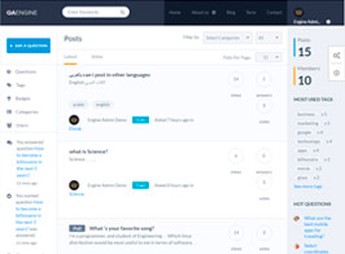
The Ask Me lets you create WordPress platforms for questions and answers in a Q&A style, with a voting system, reputation badges, topic categories, and a profile area for each participant. It’s a theme built for support communities, helpdesk sites, and collaborative knowledge portals, featuring a responsive layout and built-in moderation tools to manage questions, accepted answers, and the ranking of active users.
Key Features of Ask Me
- Questions and answers system
Complete structure to post questions, receive answers, and mark the best solution. - Reputation with badges
Awards points and badges based on participation, votes received, and answers accepted by the community. - Topic categories and tags
Organizes questions by topics and keywords to make it easier for visitors to search and navigate. - Responsive layout
Adapts display to desktops, tablets, and mobile phones while keeping readability in listings and long threads. - User profiles
Each participant has their own page with a history of questions, answers, votes, and accumulated reputation.
Benefits of Ask Me
- Ongoing community engagement
The voting and badges system encourages repeat participation and reduces reliance on the internal team. - Scalable support
Accepted answers become a permanent knowledge base, reducing the volume of repeated tickets. - User-generated content
Each answered question becomes an indexable page, expanding the site’s organic reach. - Simplified moderation
Integrated tools let you review, edit, or remove content directly from the WordPress panel.
Who Is Ask Me For?
- Anyone who wants to set up a collaborative questions and answers portal in a Stack Overflow or Quora style.
- Technical communities, niche forums, and support groups that need to centralize questions and solutions.
- Companies that want to offer a public helpdesk based on a knowledge base powered by their own customers.
How to Download Ask Me
The Ask Me is available for download here on Ultrapack. After downloading the .zip file, install it in Appearance > Themes > Add New > Upload theme, select the file, and activate the theme. Q&A, badges, and category configuration options start appearing in the panel after activation.
Ideal for anyone who needs to set up a functional questions and answers site from the very first visit, Ask Me brings voting mechanics, reputation, and profiles into a single responsive theme. The combination of a collaborative helpdesk with a permanent knowledge base serves online communities, product support, and niche portals that rely on constant interaction between members.
Frequently asked questions
Is Ask Me – Responsive Questions & Answers WordPress GPL-licensed?
Yes. Ask Me – Responsive Questions & Answers WordPress is distributed under the GPL (GNU General Public License). You may legally use, modify and redistribute it on as many sites as you want.
Can I use Ask Me – Responsive Questions & Answers WordPress on multiple sites?
Yes. You can install Ask Me – Responsive Questions & Answers WordPress on as many sites as you want. Only automatic updates through Ultrapack Auto Updater have a limit: from 3 to 80 sites, depending on the plan.
How much does Ask Me – Responsive Questions & Answers WordPress cost at Ultrapack?
Ask Me – Responsive Questions & Answers WordPress costs US$2.99 as a single purchase, and it is also included in the subscription plans starting at US$12/mo (VIP I).
Does Ask Me – Responsive Questions & Answers WordPress include updates?
Yes. The current version of Ask Me – Responsive Questions & Answers WordPress is 7.0.1, published at Ultrapack on Aug 17, 2024. Subscribers update straight from the WordPress dashboard with UAU (Ultrapack Auto Updater).
Is Ask Me – Responsive Questions & Answers WordPress scanned before publication?
Yes. Every version of Ask Me – Responsive Questions & Answers WordPress goes through a malware scan (ClamAV and YARA rules, at UltraHub) before it is published.
How to install
Automatic updates: this item is updated by the Ultrapack Auto Updater. With it installed, the new version shows up in your dashboard like any other WordPress update (how to set it up).
The file on this page is the developer’s full package, with documentation, demos and plugins. Do not upload that file to WordPress. The theme comes ready inside it, as a ZIP of its own, and that is the one you upload.
- Download the file
themeforest-7935874-ask-me-responsive-questions-answers-wordpress.zipand extract it on your computer. - Look inside the extracted files for the file
ask-me.zip. - In the WordPress dashboard, go to Appearance > Themes > Add New > Upload Theme.
- Select that file and click Install Now.
- Click Activate.
- There is nothing to zip. The ZIP inside the package is already in the format WordPress accepts.
- Uploading the whole package is the most common mistake when installing a theme: WordPress answers that no valid theme was found, and nothing is installed.
- The rest of the package belongs to the author: documentation, demo files and, in some themes, the plugins it asks for during setup.
Stuck on a step? Open a ticket telling us which one you stopped at.