Description
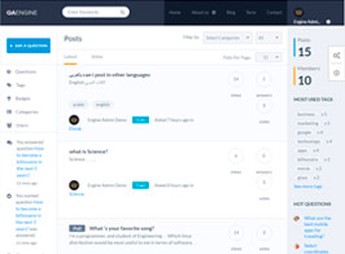
QAEngine is a WordPress theme designed for question-and-answer sites, support communities, and collaborative knowledge bases, with a question voting system, best-answer marking, and a profile area displaying user reputation. The front end displays rankings of popular topics, category filters, and instant search, turning WordPress into a Stack Overflow-style platform without requiring custom development.
Key Features of QAEngine
- Question-and-answer system
Structures open topics with a question field, multiple answers, and threaded comments. - Voting and best answer
Allows upvotes/downvotes on each item and marking the accepted answer by the question author. - User reputation
Calculates points based on contributions, displays badges, and provides a public ranking of the most active members. - Front-end submission
Allows users to create questions, answer, and edit content directly from the front end, without dashboard access. - Topic categories and tags
Organizes the collection by subject areas, with filters, internal search, and dedicated listing pages.
Benefits of QAEngine
- Self-organizing community
Voting and answer acceptance highlight useful content without constant manual moderation. - Reduced support tickets
The public collection of resolved questions serves as a customer-searchable knowledge base. - Ongoing engagement
The reputation and badge system encourages frequent returns and qualified member contributions. - Fast no-code launch
Allows you to launch a Q&A platform by configuring categories, profiles, and rules through the dashboard.
Who Is QAEngine For?
- Anyone who wants to launch a Stack Overflow- or Quora-style question-and-answer community.
- SaaS companies that need a public support base powered by their own customers.
- Those who run a technical portal, niche forum, or collaborative help desk and want to centralize questions in one place.
How to Download QAEngine
QAEngine is available for download here at Ultrapack. After downloading the .zip file, install it in Appearance > Themes > Add New > Upload Theme, select the file, and activate it. Once activation is complete, Q&A options, categories, and reputation settings will appear in the WordPress dashboard.
Designed for niche communities, customer support forums, and technical portals, QAEngine combines a voting structure, reputation-based profiles, and front-end submission in a single installation. The result is a question-and-answer platform that grows with audience participation, without requiring extensive customization or daily moderator maintenance.
Frequently asked questions
Is QAEngine – Question and Answer WordPress Theme GPL-licensed?
Yes. QAEngine – Question and Answer WordPress Theme is distributed under the GPL (GNU General Public License). You may legally use, modify and redistribute it on as many sites as you want.
Can I use QAEngine – Question and Answer WordPress Theme on multiple sites?
Yes. You can install QAEngine – Question and Answer WordPress Theme on as many sites as you want. Only automatic updates through Ultrapack Auto Updater have a limit: from 3 to 80 sites, depending on the plan.
How much does QAEngine – Question and Answer WordPress Theme cost at Ultrapack?
QAEngine – Question and Answer WordPress Theme costs US$2.99 as a single purchase, and it is also included in the subscription plans starting at US$12/mo (VIP I).
Does QAEngine – Question and Answer WordPress Theme include updates?
Yes. The current version of QAEngine – Question and Answer WordPress Theme is 2.0.1, published at Ultrapack on Dec 8, 2016. Subscribers update straight from the WordPress dashboard with UAU (Ultrapack Auto Updater).
Is QAEngine – Question and Answer WordPress Theme scanned before publication?
Yes. Every version of QAEngine – Question and Answer WordPress Theme goes through a malware scan (ClamAV and YARA rules, at UltraHub) before it is published.
How to install
Updates: manual. When a new version comes out, download it on this same page and upload it over the old one; WordPress asks whether you want to replace the current version.
The file on this page is the full package the author publishes on the marketplace: the theme, the documentation and sometimes the plugins it uses. Do not upload that file through the dashboard, because WordPress cannot find the theme inside it. What gets installed is the theme folder, which is in there.
- Download the file
themeforest-7972399-qaengine-question-and-answer-wordpress-theme.zipand extract it on your computer. - If the extracted package contains another ZIP file named after the theme, extract that ZIP as well before looking for the theme folder.
- Look for the folder that has the
style.cssfile and thescreenshot.pngimage (in this item, the folderthemeforest-7972399-qaengine-question-and-answer-wordpress-theme/qaengine). That is the theme folder. - Zip that folder only. Do not use RAR.
- In the WordPress dashboard, go to Appearance > Themes > Add New > Upload Theme and upload the ZIP file you just created.
- Click Activate.
- Uploading the whole package is the most common mistake when installing a theme. WordPress answers that no valid theme was found, and nothing is installed.
- If after extracting you already find
style.cssandscreenshot.pngin the main folder, that folder is the theme folder. - The rest of the package belongs to the author: documentation, demo files and, in some themes, the plugins it asks for during setup.
Stuck on a step? Open a ticket telling us which one you stopped at.