 UAU Ready
Description
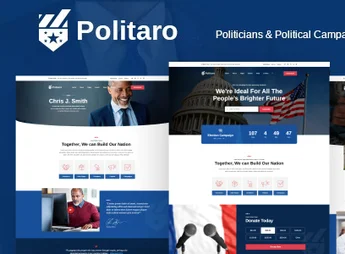
Politaro is a WordPress theme developed especially for political campaigns, candidates, parties, and activist organizations that need a strong and reliable digital presence. With a modern design and mobilization-focused features, the theme brings together everything a campaign needs: proposal promotion, event agenda, donation collection, and volunteer recruitment on a professional and easy-to-manage platform.
Main Features
- Multiple Ready Demos
A variety of layouts for candidates, parties, electoral campaigns, and social movements, importable with one click. - Visual Builder with Elementor
Drag-and-drop editing without coding, featuring dozens of theme-exclusive widgets. - Integrated Donation System
Fundraising campaigns with progress bars, goals, and contribution forms linked to payment gateways. - Event and Agenda Management
Publishing rallies, debates, meetings, and caravans with dates, locations, countdowns, and participant registrations. - Volunteer and Supporter Registration
Customizable forms to recruit campaign teams and build a contact base. - Responsive Design and SEO Optimized
Perfect visuals on phones, tablets, and desktops, with clean code and rapid loading for better Google ranking.
Politaro Benefits
- Immediate Credibility
A professional site conveys seriousness and organization, decisive factors in voter perception. - Time and Resource Savings
Ready demos and simplified setup get your campaign live in a few hours, without hiring developers. - Amplified Engagement
Donation tools, newsletters, and social media integration turn visitors into active supporters. - Total Management Autonomy
The entire team can update proposals, news, and agenda directly in the WordPress dashboard, without technical dependence.
Who is it Recommended For?
- Elective office candidates in municipal, state, and federal campaigns
- Political parties, directories, and regional committees
- NGOs, unions, social movements, and activist organizations
Politaro delivers a complete structure for those who need to communicate ideas, mobilize people, and gain support online. With features designed for the day-to-day of a campaign and full personalization freedom, the theme accompanies from pre-candidacy to office, keeping open dialogue with voters and supporters throughout the journey.
Frequently asked questions
Is Politaro – Political WordPress Theme GPL-licensed?
Yes. Politaro – Political WordPress Theme is distributed under the GPL (GNU General Public License). You may legally use, modify and redistribute it on as many sites as you want.
Can I use Politaro – Political WordPress Theme on multiple sites?
Yes. You can install Politaro – Political WordPress Theme on as many sites as you want. Only automatic updates through Ultrapack Auto Updater have a limit: from 3 to 80 sites, depending on the plan.
How much does Politaro – Political WordPress Theme cost at Ultrapack?
Politaro – Political WordPress Theme costs US$2.99 as a single purchase, and it is also included in the subscription plans starting at US$12/mo (VIP I).
Does Politaro – Political WordPress Theme include updates?
Yes. The current version of Politaro – Political WordPress Theme is 1.4, published at Ultrapack on Jul 29, 2026. Subscribers update straight from the WordPress dashboard with UAU (Ultrapack Auto Updater).
Is Politaro – Political WordPress Theme scanned before publication?
Yes. Every version of Politaro – Political WordPress Theme goes through a malware scan (ClamAV and YARA rules, at UltraHub) before it is published.
How to install
Automatic updates: this item is updated by the Ultrapack Auto Updater. With it installed, the new version shows up in your dashboard like any other WordPress update (how to set it up).
The file on this page is the developer’s full package, with documentation, demos and plugins. Do not upload that file to WordPress. The theme comes ready inside it, as a ZIP of its own, and that is the one you upload.
- Download the file
elements-politaro-political-wordpress-theme.zipand extract it on your computer. - Look inside the extracted files for the file
politaro.zip. - In the WordPress dashboard, go to Appearance > Themes > Add New > Upload Theme.
- Select that file and click Install Now.
- Click Activate.
- There is nothing to zip. The ZIP inside the package is already in the format WordPress accepts.
- Uploading the whole package is the most common mistake when installing a theme: WordPress answers that no valid theme was found, and nothing is installed.
- The rest of the package belongs to the author: documentation, demo files and, in some themes, the plugins it asks for during setup.
Stuck on a step? Open a ticket telling us which one you stopped at.