Description
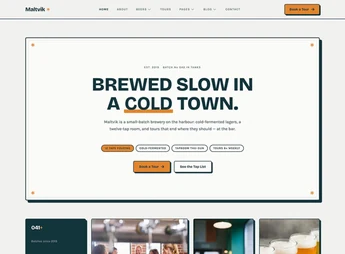
Maltvik brings together ready-to-import page templates in Elementor, with a visual identity built around the craft brewery universe: label presentation, brand history sections, taproom, and contact. Each layout creates a complete brewery website without needing to design pages from scratch, just replace texts, photos, and colors with your brand’s content within the visual editor itself.
Main Features of Maltvik
- Importable templates in Elementor
Ready pages that enter the builder’s library and open already editable. - Page structure for the brewery niche
Sections organized for labels, production process, brand history, and contact. - Visual editing without code
Texts, images, colors, and spacing adjusted directly in the drag-and-drop editor. - Layout adaptable to screens
Responsive blocks that rearrange columns on tablets and phones. - Cohesive visual identity
Typography, palette, and standardized components across all kit pages.
Benefits of Maltvik
- Website live in less time
Setup starts from ready pages, shortening weeks of visual work. - Designer independence
Content and color adjustments are within reach of non-programmers. - Consistency across pages
Home, about, and contact keep the same standard without manual rework. - Ready base to grow
New sections leverage the blocks already configured in the kit.
Who is Maltvik For?
- Craft breweries wanting to showcase labels and production process online.
- Those managing taprooms, bars, or pubs needing a digital showcase for their venue.
- Studios creating sites in Elementor looking for a ready base for beverage sector projects.
How to Download Maltvik
Maltvik is available for download here on Ultrapack. After downloading the .zip file, upload the kit via the WordPress panel using Elementor’s template importer, at Elementor > Templates > Import Templates, and select the pages you want to use. The file is complete and ready for immediate installation.
Those working with craft beer usually have strong photos and a well-defined brand story but get stuck when organizing this into pages. Maltvik solves this step with a visual structure already designed for the sector, focusing the effort on content. The result is a site aligned with the craft production vibe, editable anytime within Elementor.
Frequently asked questions
Is Maltvik – Craft Beer & Brewery Elementor Template Kit GPL?
Yes. Maltvik – Craft Beer & Brewery Elementor Template Kit is distributed under the GPL (GNU General Public License). You may legally use, modify and redistribute it on as many sites as you want.
Can I use Maltvik – Craft Beer & Brewery Elementor Template Kit on more than one site?
Yes. You can use Maltvik – Craft Beer & Brewery Elementor Template Kit on as many sites as you want.
How much does Maltvik – Craft Beer & Brewery Elementor Template Kit cost at Ultrapack?
Maltvik – Craft Beer & Brewery Elementor Template Kit costs US$2.99 as a single purchase, and it is also included in the subscription plans starting at US$17/mo (Desenvolvedor I).
Does Maltvik – Craft Beer & Brewery Elementor Template Kit include updates?
When a new version of Maltvik – Craft Beer & Brewery Elementor Template Kit becomes available in the catalog, you can download the file during the access period of your purchase or subscription. To update, follow the installation or import procedure described in the documentation for the item and its platform.
Is Maltvik – Craft Beer & Brewery Elementor Template Kit checked before it is made available for download?
Files for Maltvik – Craft Beer & Brewery Elementor Template Kit are scanned before publication by UltraHub using ClamAV and YARA rules to detect known threats. This check does not guarantee the absence of risks. Check the item requirements, make a backup, and follow the installation or import instructions for its platform.
How to install
Updates: manual. When a new version comes out, download it on this same page and import it again with Template Kit Import. Template Kits are not updated from the WordPress Themes or Plugins screen.
A template kit is neither a theme nor a plugin. It is imported, and it needs Elementor installed on the site.
- Install and activate the Template Kit Import plugin, which is also here in the catalog.
- Download the file
elements-maltvik-craft-beer-brewery-elementor-template-kit.zip. - In the WordPress dashboard, go to Template Kits > Import Kit and upload the file
elements-maltvik-craft-beer-brewery-elementor-template-kit.zip. - Pick the templates you want to import and confirm.
- The imported templates end up under Templates > Saved Templates, ready to open in Elementor.
- Some kits use Elementor Pro features. Without it the templates still import, but some blocks have no effect.
Stuck on a step? Open a ticket telling us which one you stopped at.