 UAU Ready
Description
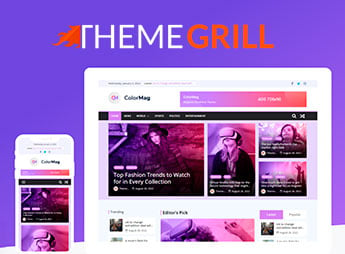
ColorMag Pro builds news portals, online magazines, and editorial blogs on Gutenberg, combining integration with Magazine Blocks and ad areas ready for monetization. With more than 50,000 publishers using the free version and a prominent position among news and magazine themes on WordPress.org, it is designed for those who publish content daily and need a layout optimized for Core Web Vitals from the start.
Key Features of ColorMag Pro
- Quick-install demos
More than 30 ready-made demos for niches such as news, health, sports, entertainment, and fashion. - Post layout blocks
Integration with Magazine Blocks adds Gutenberg blocks dedicated to grids and editorial highlights. - Built-in ad areas
Widget areas reserved for advertising monetization without additional plugins. - WooCommerce compatibility
Allows you to add a store to your news portal without switching themes. - Translation and right-to-left reading
Translation-ready files for more than 35 languages, including RTL support.
Benefits of ColorMag Pro
- Your site live in minutes
The ready-made demos eliminate the need to manually build the homepage, categories, and internal pages. - Monetization without extra setup
The built-in ad spaces eliminate the need to install third-party plugins to display campaigns. - Consistent loading on any connection
Core Web Vitals optimization keeps the portal responsive even during news-driven traffic spikes. - Easier international reach
Support for multiple languages and RTL allows you to bring the same site to audiences in other regions.
Who Is ColorMag Pro For?
- Those who publish breaking news and need a layout that prioritizes headlines.
- Those who run a niche online magazine covering topics such as health, sports, or fashion.
- Those who write a personal blog with a high volume of posts and want organization by category.
- Those who monetize editorial content with ad spaces within the layout itself.
How to Download ColorMag Pro
ColorMag Pro is available for download here on Ultrapack. After downloading the .zip file, install it under Appearance > Themes > Add New > Upload Theme, select the file, and activate it. The file is complete and ready for immediate installation.
ColorMag Pro brings together in a single theme what would normally require several separate plugins: editorial layout blocks, ad areas, and store compatibility. This reduces the number of components that need to be kept up to date on a site with frequent publishing.
For those deciding between building a news portal from scratch or starting with a foundation already tested by tens of thousands of publishers, ColorMag Pro provides a structure ready for writing and publishing from day one.
Frequently asked questions
Is ThemeGrill ColorMag Pro – Magazine & News Style WordPress Theme GPL-licensed?
Yes. ThemeGrill ColorMag Pro – Magazine & News Style WordPress Theme is distributed under the GPL (GNU General Public License). You may legally use, modify and redistribute it on as many sites as you want.
Can I use ThemeGrill ColorMag Pro – Magazine & News Style WordPress Theme on multiple sites?
Yes. You can install ThemeGrill ColorMag Pro – Magazine & News Style WordPress Theme on as many sites as you want. Only automatic updates through Ultrapack Auto Updater have a limit: from 3 to 80 sites, depending on the plan.
How much does ThemeGrill ColorMag Pro – Magazine & News Style WordPress Theme cost at Ultrapack?
ThemeGrill ColorMag Pro – Magazine & News Style WordPress Theme costs US$2.99 as a single purchase, and it is also included in the subscription plans starting at US$12/mo (VIP I).
Does ThemeGrill ColorMag Pro – Magazine & News Style WordPress Theme include updates?
Yes. The current version of ThemeGrill ColorMag Pro – Magazine & News Style WordPress Theme is 5.2.4, published at Ultrapack on Sep 10, 2026. Subscribers update straight from the WordPress dashboard with UAU (Ultrapack Auto Updater).
Is ThemeGrill ColorMag Pro – Magazine & News Style WordPress Theme scanned before publication?
Yes. Every version of ThemeGrill ColorMag Pro – Magazine & News Style WordPress Theme goes through a malware scan (ClamAV and YARA rules, at UltraHub) before it is published.
What are the requirements for the theme ThemeGrill ColorMag Pro – Magazine & News Style WordPress Theme?
Requires PHP 7.4 or higher. Tested up to WordPress 7.0.
How to install
Automatic updates: this item is updated by the Ultrapack Auto Updater. With it installed, the new version shows up in your dashboard like any other WordPress update (how to set it up).
The file on this page is already the theme, ready to upload to WordPress.
- Download the file
colormag-pro.zip. - In the WordPress dashboard, go to Appearance > Themes > Add New > Upload Theme.
- Select the file
colormag-pro.zipand click Install Now. - Click Activate.
Requirements: Requires PHP 7.4 or higher. Tested up to WordPress 7.0.
- If WordPress answers that no valid theme was found, the file is the developer’s full package and the theme is in a folder inside it. Extract the file on your computer, look for the folder that has
style.cssandscreenshot.png, zip that folder only and upload it again.
Stuck on a step? Open a ticket telling us which one you stopped at.