 UAU Ready
Description
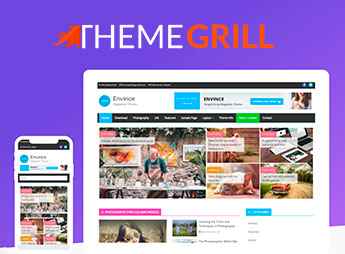
Envince Pro is built for bloggers, news portals, and corporate sites, with a responsive layout and visual customization through the native WordPress panel. It lets you import ready-made demos and adjust typography, colors, and menus without touching code, speeding up the creation of professional sites focused on publishing content.
Key Features of Envince Pro
- Homepage layouts
Preset options for blog, magazine, and business sites with post grids and lists. - Full visual customization
Adjust colors, fonts, and the header straight from the Customizer, no coding required. - Demo import
One-click demo site installation to speed up building your layout. - Custom widgets
Content blocks such as recent posts, categories, and calls to action. - Optimized responsiveness
Automatically adapts to desktops, tablets, and smartphones while keeping content readable and easy to navigate.
Benefits of Envince Pro
- Time savings
Ready-made demos and visual customization cut hours of manual setup. - A professional look without code
Even with no technical background, you can build a site that looks agency-made. - Content scalability
Efficiently organize articles, news, and corporate pages within a single theme. - Consistent experience
Responsive design delivers smooth navigation on any device with no extra tweaks.
Who Is Envince Pro For?
- Anyone running a personal or professional blog who wants a clean, reading-focused design.
- Anyone managing news portals or online magazines who needs post grids and categorization.
- Companies looking for a corporate site with an integrated blog, without relying on developers.
How to Download Envince Pro
Envince Pro is available for download here on the site. Once you have the .zip file, install it under Appearance > Themes > Add New > Upload Theme, select the .zip, and activate it. The theme is complete and ready to use right away.
Envince Pro pairs the convenience of importable demos with flexible visual customization, serving both solo content creators and editorial teams. By including dedicated layouts for blog, magazine, and business sites, it brings post and page management together in one place, so you don’t have to juggle multiple styles or extra plugins.
Frequently asked questions
Is ThemeGrill Envince Pro – Drag & Drop Magazine WordPress Theme GPL-licensed?
Yes. ThemeGrill Envince Pro – Drag & Drop Magazine WordPress Theme is distributed under the GPL (GNU General Public License). You may legally use, modify and redistribute it on as many sites as you want.
Can I use ThemeGrill Envince Pro – Drag & Drop Magazine WordPress Theme on multiple sites?
Yes. You can install ThemeGrill Envince Pro – Drag & Drop Magazine WordPress Theme on as many sites as you want. Only automatic updates through Ultrapack Auto Updater have a limit: from 3 to 80 sites, depending on the plan.
How much does ThemeGrill Envince Pro – Drag & Drop Magazine WordPress Theme cost at Ultrapack?
ThemeGrill Envince Pro – Drag & Drop Magazine WordPress Theme costs US$2.99 as a single purchase, and it is also included in the subscription plans starting at US$12/mo (VIP I).
Does ThemeGrill Envince Pro – Drag & Drop Magazine WordPress Theme include updates?
Yes. The current version of ThemeGrill Envince Pro – Drag & Drop Magazine WordPress Theme is 2.2.1, published at Ultrapack on Aug 28, 2024. Subscribers update straight from the WordPress dashboard with UAU (Ultrapack Auto Updater).
Is ThemeGrill Envince Pro – Drag & Drop Magazine WordPress Theme scanned before publication?
Yes. Every version of ThemeGrill Envince Pro – Drag & Drop Magazine WordPress Theme goes through a malware scan (ClamAV and YARA rules, at UltraHub) before it is published.
What are the requirements for the theme ThemeGrill Envince Pro – Drag & Drop Magazine WordPress Theme?
Requires PHP 5.6 or higher. Tested up to WordPress 6.2.
How to install
Automatic updates: this item is updated by the Ultrapack Auto Updater. With it installed, the new version shows up in your dashboard like any other WordPress update (how to set it up).
The file on this page is already the theme, ready to upload to WordPress.
- Download the file
envince-pro.zip. - In the WordPress dashboard, go to Appearance > Themes > Add New > Upload Theme.
- Select the file
envince-pro.zipand click Install Now. - Click Activate.
Requirements: Requires PHP 5.6 or higher. Tested up to WordPress 6.2.
- If WordPress answers that no valid theme was found, the file is the developer’s full package and the theme is in a folder inside it. Extract the file on your computer, look for the folder that has
style.cssandscreenshot.png, zip that folder only and upload it again.
Stuck on a step? Open a ticket telling us which one you stopped at.