 UAU Ready
Description
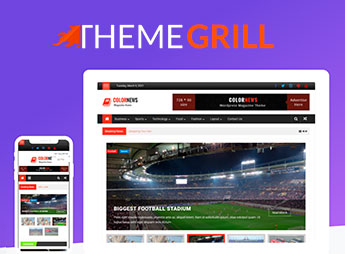
With ColorNews Pro, you build news websites and online magazines with a layout focused on headlines, categories, and multimedia content, organizing articles into customizable sections and highlighting featured posts with its own visual builder that eliminates code editing. It is suitable for news portals, sports blogs, and digital magazines that need a professional structure for publishing high-frequency content, with well-organized categories and good search engine indexing, attracting visitors and generating ad revenue.
Key Features of ColorNews Pro
- News-optimized layout
Column structure and highlight areas that prioritize headlines, calls, and high-resolution images. - Customizable highlight sections
Featured post blocks configurable by category, date, or popularity, at the top of the homepage. - Typography and color options
Native WordPress customization panel to adjust fonts, sizes, link colors, and backgrounds without code. - Compatibility with visual builders
Works with the leading page editors on the market to create internal layouts for posts and pages. - Sidebar widgets
Ready components for latest news, popular posts, tag clouds, and social networks to enrich navigation.
Benefits of ColorNews Pro
- Greater visual appeal
Automatic highlighting of top news on the homepage, increasing visitor dwell time. - Professional organization
Intuitively structured categories and tags, facilitating browsing by topic and date. - Ease of customization
Change colors, fonts, and layout via the visual panel without technical knowledge or file editing. - Fast content updates
The traditional WordPress post editor sustains a smooth publishing flow, with support for galleries and videos.
Who Is the ColorNews Pro Meant For?
- Those who publish daily news content and need a professional showcase for their stories.
- Sports bloggers looking for a layout that highlights results, rankings, and interviews.
- Digital magazines that require a robust category structure and featured content blocks on the homepage.
How to Download ColorNews Pro
ColorNews Pro is available for download here on Ultrapack. After downloading the .zip file, install it via Appearance > Themes > Add New > Upload Theme, select the .zip, and activate. The theme will appear in the list of installed themes and can be activated with a single click.
Combining a layout designed for news hierarchies, ease of customization, and full integration with the WordPress ecosystem, ColorNews Pro provides a solid foundation for portals needing a professional online presence. Whether for a sports blog, a lifestyle magazine, or a regional newspaper, the theme delivers the necessary structure to highlight content and engage audiences.
Frequently asked questions
Is ThemeGrill ColorNews Pro – Magazine WordPress Theme GPL-licensed?
Yes. ThemeGrill ColorNews Pro – Magazine WordPress Theme is distributed under the GPL (GNU General Public License). You may legally use, modify and redistribute it on as many sites as you want.
Can I use ThemeGrill ColorNews Pro – Magazine WordPress Theme on multiple sites?
Yes. You can install ThemeGrill ColorNews Pro – Magazine WordPress Theme on as many sites as you want. Only automatic updates through Ultrapack Auto Updater have a limit: from 3 to 80 sites, depending on the plan.
How much does ThemeGrill ColorNews Pro – Magazine WordPress Theme cost at Ultrapack?
ThemeGrill ColorNews Pro – Magazine WordPress Theme costs US$2.99 as a single purchase, and it is also included in the subscription plans starting at US$12/mo (VIP I).
Does ThemeGrill ColorNews Pro – Magazine WordPress Theme include updates?
Yes. The current version of ThemeGrill ColorNews Pro – Magazine WordPress Theme is 2.2.7, published at Ultrapack on Aug 28, 2024. Subscribers update straight from the WordPress dashboard with UAU (Ultrapack Auto Updater).
Is ThemeGrill ColorNews Pro – Magazine WordPress Theme scanned before publication?
Yes. Every version of ThemeGrill ColorNews Pro – Magazine WordPress Theme goes through a malware scan (ClamAV and YARA rules, at UltraHub) before it is published.
What are the requirements for the theme ThemeGrill ColorNews Pro – Magazine WordPress Theme?
Requires PHP 5.6 or higher. Tested up to WordPress 6.5.
How to install
Automatic updates: this item is updated by the Ultrapack Auto Updater. With it installed, the new version shows up in your dashboard like any other WordPress update (how to set it up).
The file on this page is already the theme, ready to upload to WordPress.
- Download the file
colornews-pro.zip. - In the WordPress dashboard, go to Appearance > Themes > Add New > Upload Theme.
- Select the file
colornews-pro.zipand click Install Now. - Click Activate.
Requirements: Requires PHP 5.6 or higher. Tested up to WordPress 6.5.
- If WordPress answers that no valid theme was found, the file is the developer’s full package and the theme is in a folder inside it. Extract the file on your computer, look for the folder that has
style.cssandscreenshot.png, zip that folder only and upload it again.
Stuck on a step? Open a ticket telling us which one you stopped at.