 UAU Ready
Description
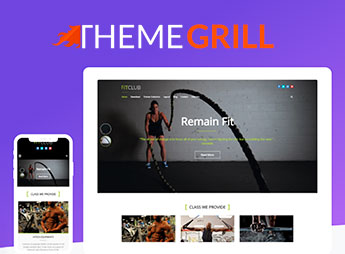
When a gym needs an institutional website that showcases its classes, schedules, and instructor team, FitClub Pro allows you to create a professional layout from ready-made demos and customize colors, typography, and sections without editing code. Developed by ThemeGrill, the theme is aimed at gyms, fitness studios, and personal trainers looking for an attractive and functional online presence, with features such as photo gallery, schedule grid, and instructor profiles, eliminating the need to hire a developer.
Principal Features of FitClub Pro
- Pre-built Demos
Import complete layouts for gyms and adjust with a click. - Fully Visual Customization
Change colors, fonts, and spacings via the WordPress dashboard. - Modular Sections
Add blocks for classes, instructors, plans, and testimonials. - Responsive Layout
The theme automatically adapts to phones and tablets. - SEO Optimization
Clean code structure for better search engine ranking.
Benefits of FitClub Pro
- Professional Presence
Create an attractive site without technical knowledge. - Rapid Creation
Save hours with ready demos and visual customization. - Higher Engagement
Showcase programs and instructors clearly and attractively. - Scalability
Expand the site with new sections as the gym grows.
Who Is FitClub Pro Designed For?
- Those who manage gyms and need a modern institutional website.
- Fitness studios aiming to promote classes and schedules online.
- Personal trainers seeking a professional page to attract clients.
How to Download FitClub Pro
FitClub Pro is available for download here on Ultrapack. After downloading the .zip file, install it via Appearance > Themes > Add New > Upload Theme, select the .zip and activate. The theme is complete and ready for immediate installation.
With FitClub Pro, gyms and fitness professionals set up their institutional website without relying on developers. Ready demos and visual customization accelerate the process, while modular sections highlight classes, instructors, and plans in an organized way. The theme provides a solid structure for those who want a professional and functional online presence in the fitness market, with the flexibility to expand as the business grows and the possibility to integrate social media and contact forms.
Frequently asked questions
Is ThemeGrill FitClub Pro – Fitness WordPress Theme GPL-licensed?
Yes. ThemeGrill FitClub Pro – Fitness WordPress Theme is distributed under the GPL (GNU General Public License). You may legally use, modify and redistribute it on as many sites as you want.
Can I use ThemeGrill FitClub Pro – Fitness WordPress Theme on multiple sites?
Yes. You can install ThemeGrill FitClub Pro – Fitness WordPress Theme on as many sites as you want. Only automatic updates through Ultrapack Auto Updater have a limit: from 3 to 80 sites, depending on the plan.
How much does ThemeGrill FitClub Pro – Fitness WordPress Theme cost at Ultrapack?
ThemeGrill FitClub Pro – Fitness WordPress Theme costs US$2.99 as a single purchase, and it is also included in the subscription plans starting at US$12/mo (VIP I).
Does ThemeGrill FitClub Pro – Fitness WordPress Theme include updates?
Yes. The current version of ThemeGrill FitClub Pro – Fitness WordPress Theme is 2.2.4, published at Ultrapack on Jun 23, 2025. Subscribers update straight from the WordPress dashboard with UAU (Ultrapack Auto Updater).
Is ThemeGrill FitClub Pro – Fitness WordPress Theme scanned before publication?
Yes. Every version of ThemeGrill FitClub Pro – Fitness WordPress Theme goes through a malware scan (ClamAV and YARA rules, at UltraHub) before it is published.
How to install
Automatic updates: this item is updated by the Ultrapack Auto Updater. With it installed, the new version shows up in your dashboard like any other WordPress update (how to set it up).
The file on this page is already the theme, ready to upload to WordPress.
- Download the file
fitclub-pro.zip. - In the WordPress dashboard, go to Appearance > Themes > Add New > Upload Theme.
- Select the file
fitclub-pro.zipand click Install Now. - Click Activate.
- If WordPress answers that no valid theme was found, the file is the developer’s full package and the theme is in a folder inside it. Extract the file on your computer, look for the folder that has
style.cssandscreenshot.png, zip that folder only and upload it again.
Stuck on a step? Open a ticket telling us which one you stopped at.